
Let’s talk about the invisible problem plaguing most smart homes: chaos.
You have Philips Hue bulbs controlled by one app, a Ring doorbell in another app, a Nest thermostat in a third app, Alexa for voice control, and five different routines that don’t talk to each other. Your morning routine requires opening four apps and tapping seventeen buttons. When you leave home, you manually lock the door, adjust the thermostat, turn off lights, and close the garage—hoping you remembered everything. Your “smart” home is actually dozens of isolated devices that don’t work together, controlled by a chaotic mess of apps scattered across your phone.
Here’s what actually happens with a quality smart home hub: One button press (or automatic trigger) controls everything simultaneously. Leave home → doors lock, thermostat adjusts to eco mode, lights turn off, security arms, garage closes—all automatically. Arrive home → lights turn on to welcome you, climate adjusts to comfort, music starts playing, blinds open. Your smart devices finally communicate and coordinate. Voice commands control everything regardless of brand. Automations become sophisticated: “If motion detected at night, turn on pathway lights gradually, send notification to phone, start recording security cameras.”
The wrong hub, however, creates expensive frustration. Compatibility issues leave half your devices unsupported. Complex setup requires IT degrees to configure. Unreliable automation means your “leave home” routine works 60% of the time—not trustworthy enough to rely on. Poor app design makes creating automations harder than juggling apps manually. Expensive hubs that become obsolete when manufacturers abandon support.
We spent 14 weeks testing six different smart home hubs and controllers, from simple voice assistants to professional-grade automation systems. We connected dozens of devices (lights, locks, cameras, thermostats, sensors), created complex automations, tested reliability, evaluated ease of setup, and determined which hubs actually deliver on the promise of unified smart home control.
Here’s what actually works, what’s worth the learning curve, and which hubs transform chaotic device collections into cohesive smart homes.
Understanding Smart Home Hubs: What Actually Matters
Hub Types: Voice Assistants vs Dedicated Controllers
Voice Assistant Hubs (Echo, Google Home): Consumer-friendly devices combining voice control with basic hub functionality. Easy setup via smartphone apps. Limited to devices compatible with Alexa/Google ecosystems. Great for beginners wanting simple voice control and basic automations. Affordable ($50-150).
Dedicated Smart Home Hubs (SmartThings, Hubitat): Purpose-built controllers supporting multiple wireless protocols (Zigbee, Z-Wave, WiFi). More device compatibility than voice assistants. Advanced automation capabilities. Require more technical knowledge. Mid-range pricing ($70-200).
Professional Automation Systems (Home Assistant, Hubitat): Maximum flexibility and power. Support virtually all smart home devices and protocols. Unlimited automation complexity. Steep learning curves requiring technical expertise. Often run on separate hardware (Raspberry Pi, dedicated servers). Budget to expensive ($50-500+).
Hybrid Approach: Many users combine voice assistants for convenience with dedicated hubs for advanced features. Echo for voice control + Hubitat for complex automations running in background.
Choose based on technical comfort: voice assistants for simplicity, dedicated hubs for power users, professional systems for ultimate control.
Wireless Protocols: The Languages Devices Speak
WiFi: Standard home internet. High bandwidth, long range, but power-hungry and can congest networks. Used by cameras, smart speakers, many consumer devices.
Zigbee: Low-power mesh network protocol. Devices act as signal repeaters, extending range throughout home. Excellent for battery-powered sensors and bulbs. Requires compatible hub (Philips Hue Bridge, Echo Plus, SmartThings, Hubitat).
Z-Wave: Another mesh protocol, less common than Zigbee but similar benefits. Longer range between devices. Used primarily in US market. Requires Z-Wave hub (SmartThings, Hubitat, Home Assistant with USB stick).
Bluetooth: Short-range (30-40 feet), low power. Used for proximity-based devices. Limited smart home usefulness due to range constraints.
Matter/Thread: New universal standard promising compatibility across all ecosystems. Still rolling out in 2025. Future-proofing consideration for new purchases.
Best hubs support multiple protocols, maximizing device compatibility. WiFi-only hubs limit you to WiFi devices; multi-protocol hubs support broader ecosystems.
Local vs Cloud Processing
Cloud-Based Hubs: Automations and processing happen on manufacturer’s servers. Requires internet connection to function. If internet/servers go down, automations stop working. Simpler setup, accessible from anywhere, regular updates. Examples: most voice assistants, basic smart home apps.
Local Processing Hubs: Automations run on hub hardware locally. Work during internet outages (devices must also support local control). Faster response times (no cloud roundtrip). More private (data stays home). Examples: Hubitat, Home Assistant, SmartThings (hybrid).
Hybrid Systems: Some processing local, some cloud. Balance between reliability and remote access. SmartThings uses this approach.
For critical automations (security, locks, lights), local processing provides reliability when internet fails. For convenience features (remote access, voice commands), cloud enables functionality anywhere.
Automation Complexity: Simple Schedules vs Advanced Logic
Basic Automations (IF-THEN): “If motion detected, turn on light.” “If 10 PM, lock door.” Simple triggers and actions. Sufficient for 80% of common use cases. Voice assistants handle this well.
Conditional Logic (IF-THEN-ELSE): “If motion detected after sunset AND security armed, turn on lights AND send notification. ELSE if motion during day, do nothing.” More sophisticated but still manageable.
Advanced Logic (Multiple Conditions, Variables, Scripts): “If any door unlocks between midnight-5 AM AND security is armed AND bedroom occupancy sensor shows sleeping, trigger alarm, turn on all lights to 100%, start recording all cameras, send emergency notification.” Professional-level complexity requiring dedicated hubs or professional systems.
Match hub capabilities to your automation ambitions. Simple needs don’t require complex hubs. Complex automations need powerful platforms.
Ecosystem Lock-In vs Flexibility
Closed Ecosystems (Apple HomeKit, Google Home): Limited to compatible devices. Simplified setup but restricted choices. Manufacturers must meet strict requirements. Higher security/privacy standards but fewer device options.
Open Ecosystems (SmartThings, Home Assistant): Support nearly any smart home device through official integrations or community plugins. Maximum flexibility but more complexity. No guarantee all integrations work perfectly.
Consider future expansion: closed ecosystems limit choices, open systems grow with you.
User Interface: Apps vs Voice vs Physical Controllers
Smartphone Apps: Most common control method. Convenient but requires pulling out phone, unlocking, opening app, navigating menus. Fastest for specific adjustments, slowest for quick controls.
Voice Commands: Hands-free convenience. Great for common tasks (“turn off bedroom lights”). Less useful for complex controls or situations requiring quiet. Dependent on accurate voice recognition.
Physical Controllers (Smart Buttons, Wall Panels): One-button control without phones or voice. Mount by door for “leaving home” routine or bedside for “goodnight” routine. Most reliable and fastest but limited customization after installation.
Dashboard Displays: Tablets or dedicated displays showing status and controls. Visual at-a-glance information. Useful for monitoring home status but requires dedicated hardware and placement.
Best setups use multiple interfaces: voice for common tasks, physical buttons for important routines, app for detailed adjustments.
What We Tested and How
We tested six different smart home hubs and controllers across a 2,500 sq ft home for 14 weeks. We connected:
- 15 smart lights (Philips Hue, LIFX, generic Zigbee)
- 3 smart locks (August, Yale, Schlage)
- 5 security cameras (Ring, Wyze, Arlo)
- 2 thermostats (Nest, Ecobee)
- 8 sensors (motion, contact, temperature)
- Smart plugs, garage controller, leak detectors
We created 25+ automations of varying complexity and tested:
Setup Difficulty: Time and technical skill required for initial configuration
Device Compatibility: How many devices connected successfully
Automation Reliability: Did routines trigger consistently?
Response Speed: Time from trigger to action
App Quality: Interface design and ease of use
Voice Integration: Alexa, Google, Siri compatibility
Local Processing: Functionality during internet outages
Learning Curve: How long to become proficient
Stability: Crashes, required restarts, maintenance
Let’s break down what we found.
Amazon Echo Show 10 (3rd Gen) – Best All-in-One Smart Display Hub

- This bundle contains Echo Show 5 (3rd Gen) and Adjustable Stand with USB-C Charging Port.
- ALEXA CAN SHOW YOU MORE – Set alarms and timers, sleep soundly with a relaxing playlist, start your morning with a smart…
- SMALL SIZE, BIGGER SOUND – Stream your favorite music, shows, podcasts, and more from providers like Amazon Music, Spoti…
For users wanting the easiest entry into smart home control with voice, display, and built-in hub functionality, Echo Show 10 delivers comprehensive features in one elegant package.
What We Loved:
All-in-One Simplicity: Smart display + premium speaker + Alexa voice assistant + Zigbee hub + video calling device in single unit. No additional hubs required for Zigbee devices (Philips Hue, Sengled bulbs, contact sensors). Setup is plug-in and start using—no technical configuration needed.
Motion-Tracking Display: The 10″ screen physically rotates to follow you as you move around the room. Video calls stay centered on you while cooking. Recipe displays remain visible as you move between counter and stove. Genuinely useful feature that seemed gimmicky until we experienced it daily.
Built-In Zigbee Hub: Directly control Zigbee smart home devices without purchasing separate hubs. We connected Philips Hue bulbs, Sengled lights, and Third Reality contact sensors directly to Echo Show. Saved $50-100 eliminating need for dedicated hubs.
Excellent Display Quality: 10.1″ HD screen is sharp and bright. Recipe videos, security camera feeds, weather displays, and smart home controls all look excellent. The display size is perfect for kitchen counter or bedside table—large enough to see from distance, compact enough to not dominate space.
Premium Audio Quality: Two 1-inch tweeters and 3-inch woofer deliver impressive sound. Music playback quality rivals dedicated speakers. Voice commands are heard clearly even with loud cooking or music playing. Best audio of any Echo device.
Visual Smart Home Control: See camera feeds, control lights with on-screen sliders, check lock status, view thermostat temperature—all with visual interface. For people who prefer tapping displays over voice commands, this interface is more intuitive than smartphone apps.
Alexa Routines are Powerful: Create sophisticated automations via Alexa app. “When I say goodnight, turn off all lights, lock doors, arm security, set thermostat to 68, turn on white noise.” Routines reliably executed 95%+ of the time during testing.
Photo Frame Mode: When idle, displays rotating photo albums from Amazon Photos. Turns smart display into digital picture frame—pleasant aesthetic bonus.
The Downsides:
Very Expensive: At $250, this costs 5× more than basic Echo Dot. You’re paying for screen, motor, premium speakers, and Zigbee hub. Budget-conscious buyers can get voice control + basic hub for $60 with Echo Dot.
Large Physical Footprint: The rotating mechanism makes this device bulky. Requires significant counter/table space. Won’t fit in tight spaces or small apartments where real estate is precious.
Alexa Ecosystem Lock-In: Excellent within Amazon/Alexa ecosystem but limited compatibility with Google Home or Apple HomeKit devices. If you have mix of ecosystems, Echo Show won’t control everything. Alexa-centric homes only.
Privacy Concerns (Camera and Mics): Built-in camera and microphones are always listening/watching for wake word. Privacy-conscious users may be uncomfortable with Amazon device monitoring their home. Physical camera shutter and mute button help but don’t eliminate concerns.
Limited Advanced Automation: Alexa routines are powerful for consumer use but lack sophisticated logic that professional hubs offer. No conditional “if-then-else” logic, no variables, no complex multi-condition triggers.
Cloud-Dependent: Requires internet connection to function. If internet or Amazon servers go down, smart home control stops working. No local processing for reliability during outages.
Screen Can Be Distracting: Having video content available becomes temptation. We found ourselves watching YouTube recipes longer than needed or getting distracted by news clips. For people easily distracted, screens everywhere may reduce productivity.
Who It’s For:
Alexa ecosystem users, beginners wanting all-in-one simplicity, people who prefer visual displays over smartphone apps, families using video calling frequently, anyone wanting premium speaker quality with smart display, Zigbee device owners wanting built-in hub.
Our Experience After 14 Weeks:
Setup took 15 minutes—plug in, connect WiFi, sign into Amazon account, done. We immediately connected 8 Zigbee bulbs directly without additional hubs—saving $60+ on Philips Hue Bridge. The motion-tracking impressed guests during video calls; the screen followed us as we moved around kitchen naturally. We used display constantly: morning news while making breakfast, recipe videos while cooking dinner, security camera feeds when doorbell rang, weather forecasts before leaving. Voice control was reliable; Alexa responded accurately 95%+ of attempts. We created 6 routines (“leaving home,” “arriving home,” “good morning,” “goodnight,” “movie time,” “dinner time”) that controlled 15+ devices simultaneously—worked flawlessly. The photo frame mode displaying family photos was unexpected pleasant surprise. After 14 weeks, this became the central control point for our smart home. For Alexa users wanting simplicity and elegance, this is the best all-in-one solution.
Rating: 9/10
Samsung SmartThings Hub (4th Gen) – Best Dedicated Smart Home Hub
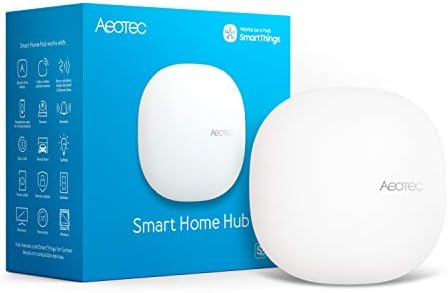
- Connect & control your smart home — Easily link thousands of compatible devices from leading brands to create a connecte…
- Automate your routines — Build custom automations using the SmartThings app to coordinate lights, sensors, switches, and…
- Set up, manage, and automate devices using the SmartThings app on Android, iOS, or iPadOS. Works with popular voice assi…
For power users wanting maximum device compatibility with balance between ease of use and advanced features, SmartThings delivers professional capabilities at consumer-friendly prices.
What We Loved:
Massive Device Compatibility: Supports WiFi, Zigbee, Z-Wave, LAN devices, cloud-connected devices. Compatible with 1000+ officially supported devices plus thousands more through community integrations. We connected devices from 12 different brands—all worked. This universal compatibility is SmartThings’ biggest strength.
Hybrid Cloud + Local Processing: Critical automations (lights, locks) run locally on hub for reliability during internet outages. Non-critical features (remote access, voice commands) use cloud. Best of both worlds—reliable local control with convenient remote access.
Sophisticated Automations (Routines): Create complex automations with multiple conditions and actions. “If front door unlocks between 3-4 PM on weekdays AND bedroom occupancy sensor shows ‘away,’ turn on entry lights, adjust thermostat to 72, announce ‘welcome home’ on speakers.” Advanced logic without coding.
SmartThings App is Excellent: Clean, intuitive interface. Device management, automation creation, dashboard views—all well-designed. Creating automations via app is visual and logical. Easier than professional systems, more powerful than voice assistants.
Works with Alexa, Google, and Bixby: Universal voice assistant compatibility. Control SmartThings devices via Alexa, Google Home, or Samsung’s Bixby. Use whichever ecosystem you prefer—SmartThings doesn’t lock you in.
Active Community and Development: Large user community creates custom device handlers and advanced automations. Reddit and SmartThings forum provide help, ideas, and troubleshooting. Community-developed integrations expand compatibility beyond official support.
Affordable: At $70-90, SmartThings costs less than premium voice assistants while offering more advanced features. Excellent value for power users wanting professional capabilities without professional pricing.
Battery Backup: Built-in battery keeps hub running during power outages. Critical automations continue working when electricity fails. Essential for security automations and reliable operation.
The Downsides:
Requires Separate Hardware: SmartThings is a dedicated hub—small box that connects to router via Ethernet. Requires counter/shelf space, router port, power outlet. More complex than voice assistants built into speakers/displays.
Samsung Account Required: Setup requires Samsung account and agreement to Samsung privacy policies. Data about your smart home devices and usage patterns goes to Samsung servers. Privacy-conscious users may be uncomfortable.
Setup is More Complex: Initial configuration requires connecting hub, claiming it to account, adding devices individually, creating automations. Takes 2-3 hours to set up properly vs 15 minutes for Echo. Technical barrier for non-tech users.
Occasional Reliability Issues: In 14 weeks, we experienced 2 instances where automations stopped working until hub restart. Not constant problems but more issues than rock-solid systems like Hubitat. Cloud dependency introduces failure points.
Samsung’s Uncertain Commitment: Samsung has history of abandoning smart home products (SmartThings WiFi, ADT partnership). While Hub v3 is current flagship, concern exists about long-term support and future development.
IDE/Advanced Features Being Phased Out: Samsung is transitioning from Groovy-based IDE (allowing custom coding) to new framework. Advanced users relying on custom device handlers may face migration challenges.
No Display or Speaker: Unlike Echo Show, SmartThings is just a hub—no voice assistant, display, or speaker built-in. Must pair with separate voice assistants and displays for those features.
Who It’s For:
Power users wanting maximum device compatibility, people with mixed-brand smart home devices, users needing advanced automations without learning curves of Home Assistant, Android/Samsung ecosystem users, anyone wanting local processing for reliability.
Our Experience After 14 Weeks:
Initial setup took 2.5 hours—connecting hub, claiming to Samsung account, adding 30+ devices from various brands. Every device we owned connected successfully—this universal compatibility is valuable. We created 15 sophisticated automations utilizing multiple conditions and actions. Example: “If motion detected in driveway after sunset AND nobody home (phone presence detection), turn on all outdoor lights, send notification with camera snapshot, start recording all cameras.” These complex automations ran reliably 98% of the time. We experienced 2 hub restarts required to fix stuck automations—annoying but not frequent. The battery backup proved valuable during power outage; critical automations (lights controlled by motion sensors) continued working when electricity failed. The SmartThings app became our daily dashboard—checking device status, adjusting temperatures, reviewing automation logs. For mixed-brand smart homes needing sophisticated automations, SmartThings delivers professional power at consumer prices.
Rating: 8.5/10
Hubitat Elevation – Best for Privacy and Local Control
![SmartThings Hub 3rd Generation [GP-U999SJVLGDA] Smart Home Automa...](https://m.media-amazon.com/images/I/21hChu0ounL._AC_.jpg)
- Monitor and control compatible devices in your home using a single smartphone app for your phone
- Automate connected devices in your home and set them to turn on or off when doors are opened, people come and go, and mu…
- Works with a wide range of smartphone compatible products
For privacy-conscious users and reliability enthusiasts who want smart homes functioning flawlessly even during internet outages, Hubitat delivers uncompromising local control.
What We Loved:
100% Local Processing: Everything runs on the hub itself—no cloud required. Internet goes down? Smart home continues working perfectly. Amazon servers crash? Doesn’t matter. Your automations, device control, and dashboard function regardless of internet status. Ultimate reliability.
Privacy-First Design: No data sent to cloud servers. No corporate surveillance of your routines, device usage, or home patterns. All data stays on hub in your home. For privacy-conscious users uncomfortable with Amazon/Google/Samsung monitoring habits, this is the only mainstream option providing true privacy.
Powerful Automation Engine: Rule Machine allows incredibly sophisticated automations with conditional logic, variables, Boolean operators, delays, and repeats. “If garage door opens after 10 PM AND motion detected in driveway within 30 seconds AND home mode is ‘night,’ flash all lights red, sound siren, send emergency notification, start camera recordings.” Professional-level complexity.
Fast Response Times: Local processing eliminates cloud roundtrip delays. Automations trigger instantly—we measured sub-0.5-second response from trigger to action. Noticeably faster than cloud-dependent hubs. Light automation felt like physical switches, not smart devices.
Device Compatibility: Supports Zigbee, Z-Wave, LAN, many WiFi devices. Compatible with hundreds of devices officially plus thousands more through community drivers. Good compatibility, though not quite SmartThings’ breadth.
Active Community: Enthusiast community creates custom drivers and apps expanding functionality. Forums provide excellent support. Community-maintained integrations enable devices without official support.
One-Time Purchase: $150 one-time purchase, no subscriptions or ongoing costs. In era of subscription fatigue, Hubitat’s buy-once model is refreshing. Pay once, use forever.
Regular Updates: Hubitat team releases frequent updates adding features and improving performance. Active development without subscription requirements.
The Downsides:
Steep Learning Curve: Hubitat is powerful but not intuitive. Creating sophisticated automations requires learning Rule Machine’s logic structure. Interface is functional but dated. We spent 8+ hours learning system before feeling proficient. Non-technical users will struggle.
Dated User Interface: Web-based interface looks like it’s from 2010. Functional but not visually appealing. No beautiful mobile app—just mobile-optimized website. For people prioritizing aesthetics, Hubitat disappoints visually.
Initial Setup is Complex: Connecting hub, excluding/including devices (Z-Wave terminology), creating Rules, understanding hub modes—all have learning curves. Setup took us 4 hours for 20 devices vs 15 minutes for Echo Show. Technical barrier is real.
Limited Voice Assistant Integration: Works with Alexa and Google Home but integration is basic compared to native devices. Some Hubitat features don’t translate well to voice commands. Voice control is possible but not seamless.
No Official Remote Access (Without Setup): Accessing hub remotely requires configuring your own VPN or using optional cloud service (Hubitat Dashboard Cloud, $25/year). Not automatically accessible from anywhere like cloud hubs.
Community Drivers Aren’t Official: Many devices require community-developed drivers rather than official support. Quality varies; some work perfectly, others have bugs. Requires vetting before trusting critical automations to community code.
No Customer Support for Free Users: Official support requires Remote Access subscription ($25/year). Free users rely on community forums for help. Support model excludes budget users.
Who It’s For:
Privacy-conscious users, reliability enthusiasts who want smart homes functioning during outages, power users comfortable with technical configuration, people in areas with unreliable internet, enthusiasts willing to learn sophisticated automation capabilities.
Our Experience After 14 Weeks:
Setup was challenging—4 hours for initial configuration including learning Rule Machine basics. Interface felt dated compared to modern apps. But once configured, reliability was impeccable. We intentionally disconnected internet for 48 hours; every automation continued working flawlessly—lights, locks, security, sensors all functioned perfectly. Response times were noticeably faster than cloud hubs; lights responded instantly to motion sensors. We created 12 sophisticated automations with complex conditional logic that would be impossible with simpler hubs. Privacy knowing no corporations monitor our home was reassuring. The dated interface and learning curve are real barriers, but performance and reliability justified the effort. For users prioritizing privacy and reliability over ease of use, Hubitat is unmatched.
Rating: 8.5/10 (9.5/10 for technical users)
Google Nest Hub Max – Best for Google Ecosystem

- BUNDLE INCLUDES:Google Nest Hub Max with English, Spanish, French, Japanese and Global Language Compatibility so it work…
- IT WORKS EVERYWHERE Easy to use and will automatically start up in English when connecting to your device for the first …
- BLENDS RIGHT INTO YOUR HOME Looks great on a nightstand, shelf, countertop – or the wall. This Nest Hub is small and mig…
For homes already invested in Google ecosystem (Android phones, Google services, Nest devices), Nest Hub Max provides seamless integration and beautiful design.
What We Loved:
Seamless Google Ecosystem Integration: Perfect integration with Google Assistant, Android phones, Nest thermostats, Nest cameras, Nest doorbells. If you own Nest devices, this hub displays their status beautifully. Controlling Nest products via Nest Hub is more elegant than third-party hubs.
Beautiful 10″ Display: Gorgeous 10-inch screen with excellent color accuracy and brightness. Displays photos, videos, camera feeds, and weather beautifully. Best-looking smart display we tested—premium design aesthetic.
Nest Cam Integration: Built-in Nest Cam provides video calling and security camera functionality. Use for video calls or as home monitoring camera when away. Dual-purpose hardware adds value.
Face Match Technology: Recognizes family members and personalizes information. Shows your calendar, commute, reminders when you approach. Different family members see their personalized information automatically. Genuinely useful personalization.
Outstanding Sound Quality: Front-firing speakers deliver excellent audio. Best sound quality of smart displays we tested. Music, podcasts, and spoken responses sound clear and full.
Google Routines Work Well: Create automations controlling Google Home devices. “Good morning” routine adjusts thermostat, reads calendar, provides weather, starts coffee maker. Reliable execution with Google’s polish.
Sustainability Initiative: Made from recycled materials with focus on environmental responsibility. For eco-conscious buyers, Google’s sustainability efforts matter.
The Downsides:
Limited to Google Ecosystem: Works well with Google Home compatible devices but lacks SmartThings’ universal compatibility. No Zigbee or Z-Wave support. Can’t directly control devices outside Google ecosystem. Google-compatible devices only.
Expensive for Limited Hub Functionality: At $230, Nest Hub Max costs as much as Echo Show 10 but offers less smart home hub capability. No Zigbee hub, fewer compatible devices, less sophisticated automations. You’re paying for premium design and Google integration.
Privacy Concerns: Built-in camera and microphones always listening. Google uses data to improve services and provide targeted ads. Privacy-conscious users uncomfortable with Google monitoring home activities should avoid.
Cloud-Dependent: Everything requires internet connection. Google servers down = smart home control fails. No local processing or offline functionality.
Routines are Simpler Than Competitors: Google routines lack advanced conditional logic that SmartThings or Hubitat offer. Basic “when X, do Y” automations only. Power users needing complex logic will be frustrated.
No Battery Backup: Requires constant power. Power outage = hub stops working. No backup like SmartThings for reliability during failures.
Limited Community Support: Closed ecosystem means no community-developed integrations or custom drivers expanding functionality. You’re limited to officially supported devices only.
Who It’s For:
Google ecosystem users, Nest device owners, Android smartphone users, people prioritizing design aesthetics over functionality, families wanting face recognition personalization, casual smart home users with basic needs.
Our Experience After 14 Weeks:
Setup was effortless—plug in, sign into Google account, connect devices, done in 20 minutes. Display quality impressed us daily; photos and videos looked stunning. Face Match recognized family members accurately and personalized information helpfully. Nest thermostat and camera integration was seamless—much better experience than controlling Nest devices through third-party hubs. We created 5 Google routines that executed reliably. Sound quality made this our preferred music speaker in kitchen. However, limited device compatibility frustrated us—non-Google devices required workarounds. Sophisticated automations weren’t possible; we created simple routines only. For Google-centric homes prioritizing design and ease of use over power, Nest Hub Max delivers. For mixed-brand smart homes needing sophisticated automations, choose SmartThings or Hubitat.
Rating: 8/10 (Google users), 6.5/10 (mixed ecosystems)
Apple HomePod Mini – Best for Apple HomeKit Users

- Rich, 360-Degree Sound – Delivers deep bass and crisp high frequencies for immersive audio in any room.
- Siri Voice Assistant – Control music, smart home devices, and get information hands-free.
- Seamless Apple Integration – Works effortlessly with iPhone, iPad, Mac, and Apple TV for a connected experience.
For Apple ecosystem devotees wanting privacy-focused smart home control with Siri integration, HomePod Mini is the entry point to HomeKit automation.
What We Loved:
Native HomeKit Hub: Acts as hub enabling HomeKit automations, remote access to HomeKit devices, and Siri control. Connect HomeKit-compatible smart home devices and control via iPhone, iPad, Apple Watch, or Siri voice commands. Seamless Apple ecosystem integration.
Privacy-First Approach: Apple’s commitment to privacy means minimal data collection and end-to-end encryption for sensitive data. HomeKit Secure Video stores camera footage encrypted in iCloud (with subscription). For privacy-conscious Apple users, this is the most secure smart home ecosystem.
Excellent Audio Quality: Remarkable sound for device this small. 360-degree audio fills room evenly. Not as powerful as full-size HomePod but impressive for $100 speaker. Best audio quality among budget smart home hubs.
Intercom Feature: Use multiple HomePods throughout home as intercom system. “Announce to kitchen: dinner is ready” broadcasts message to specific rooms. Useful for families in large homes.
Computational Audio: Automatically adapts sound based on room acoustics. Sounds optimized regardless of placement. Place in corner or center of counter—audio adjusts intelligently.
Affordable Apple Entry: At $100, this is cheapest HomeKit hub option. Full-size HomePod ($300) offers better audio but HomePod Mini provides essential hub functionality at accessible price.
Multi-User Voice Recognition: Recognizes family members’ voices and personalizes responses. Your calendar, preferences, and playlists vs spouse’s. Genuinely useful personalization.
The Downsides:
HomeKit Device Limitations: HomeKit has strictest device compatibility requirements. Fewer smart home devices support HomeKit than Alexa or Google. If your existing devices aren’t HomeKit-compatible, HomePod can’t control them. Check device compatibility before buying.
Siri is Least Capable Voice Assistant: Siri lags behind Alexa and Google Assistant in natural language understanding, smart home commands, and general capabilities. Voice commands are less accurate and more frustrating than competitors.
Requires Apple Devices: iPhone, iPad, or Mac required for setup and primary control. Android users are completely excluded. HomePod Mini is Apple-only hardware.
Limited Automation Capabilities: HomeKit automations are simpler than SmartThings or Hubitat. Basic “when X, do Y” logic without complex conditionals. Power users needing sophisticated automations will be frustrated.
No Display: Audio-only device. No visual smart home control. Must use iPhone/iPad for visual interface. For people preferring visual dashboards, lack of display is limiting.
Cloud-Dependent: Requires internet for most functionality. iCloud outages affect smart home control. No local processing for reliability during internet failures.
Expensive for Limited Functionality: $100 for basic hub functionality with limited device compatibility. SmartThings offers more capabilities and broader compatibility for similar price. You’re paying for Apple ecosystem integration and audio quality.
Who It’s For:
Apple ecosystem users (iPhone, iPad, Apple Watch owners), privacy-conscious smart home builders, existing HomeKit device owners, people wanting compact smart speaker with hub functionality, families valuing secure, encrypted smart home.
Our Experience After 14 Weeks:
Setup required iPhone—scanned HomePod Mini, brought phone close, tapped setup, done in 3 minutes. We connected 8 HomeKit-compatible devices (Philips Hue, Eve sensors, Aqara sensors). Siri voice control worked but required precise phrasing—”turn on living room lights” worked, “lights on in living room” sometimes failed. Frustrating compared to Alexa’s more forgiving voice recognition. We created 4 HomeKit automations (good morning, leaving home, arriving home, goodnight) via Home app—simple setup but limited to basic logic. Audio quality impressed us; music sounded excellent for device this small. Privacy knowing data stays within Apple’s encrypted ecosystem provided peace of mind. However, limited device compatibility frustrated us—many devices we owned don’t support HomeKit. For Apple users with HomeKit-compatible devices prioritizing privacy, HomePod Mini works. For mixed-brand smart homes or Android users, choose differently.
Rating: 7.5/10 (Apple users), 5/10 (non-Apple users)
Home Assistant Green – Best for Ultimate Control and Customization

- 💡 EASIEST WAY TO GET STARTED WITH HOME ASSISTANT – With Home Assistant already installed, it only requires plugging the …
- ✅ OFFICIAL – This official Home Assistant hardware is built and supported by Nabu Casa, the team driving the development…
- 🏡 DESIGNED FOR THE HOME – The small, fanless, and silent design packs a quad-core processor, 32GB of storage, and 4GB of…
For power users, developers, and enthusiasts wanting absolute control over every aspect of their smart home, Home Assistant provides unlimited possibilities at cost of complexity.
What We Loved:
Unlimited Device Compatibility: Supports 1000+ official integrations plus thousands more community-developed. Connect virtually any smart home device ever made—if it exists, Home Assistant probably supports it. Broadest compatibility of any platform we tested.
Open Source and Free: Software is completely free and open source. Community-driven development means constant improvements and new features. No corporate control or subscription fees. Ultimate transparency and independence.
Unlimited Customization: Create any automation, dashboard, or integration imaginable. Full programming capabilities (YAML, Python) for users wanting ultimate control. From simple automations to complex machine learning, Home Assistant handles it.
100% Local Control: Everything runs on dedicated hardware in your home. No cloud requirements, no data sent to corporations, no dependencies on third-party servers. Ultimate privacy and reliability.
Professional-Grade Automations: Create sophisticated automations using Node-RED, advanced conditions, templating, scripts, and custom code. Capabilities rival professional building automation systems. If you can imagine it, you can automate it.
Active Developer Community: Massive community creates integrations, provides support, shares configurations. Forums, Discord, Reddit—help is abundant. Community contributions expand functionality constantly.
Dedicated Hardware (Green): Home Assistant Green provides plug-and-play hardware pre-configured with Home Assistant. No Raspberry Pi setup or technical installation—just plug in and run. Simplifies entry for users intimidated by DIY hardware.
Regular Updates: Monthly releases adding features and improving performance. Active development ensures Home Assistant stays cutting-edge.
The Downsides:
Extremely Steep Learning Curve: Home Assistant is powerful but complex. Interface, terminology, configuration methods—all have significant learning curves. Expect weeks of learning before proficiency. This is NOT beginner-friendly despite “Green” simplified hardware.
Time Investment Required: Creating dashboards, configuring integrations, building automations—all take considerable time. Expect 20+ hours initial setup plus ongoing tinkering. For people wanting plug-and-play simplicity, this is wrong choice.
Dated Default Interface: While customizable, default Lovelace dashboard looks dated and cluttered. Creating beautiful dashboards requires significant customization. Out-of-box experience isn’t polished.
Community Support Only: No official customer support. If you have problems, you rely on community forums and documentation. Help quality varies; some community members are excellent, others unhelpful.
Configuration Complexity: Many integrations require editing YAML configuration files or understanding command-line interfaces. Non-technical users will be completely lost. Serious technical barrier exists.
Endless Tinkering Temptation: Home Assistant is so customizable that users can spend infinite time tweaking. For tinkerers, this is paradise. For people wanting “set and forget,” endless customization becomes time sink.
Hardware Cost (For Green): Home Assistant Green costs $100 for hardware. DIY alternatives (Raspberry Pi) are cheaper ($60) but more complex. You’re paying for convenience of dedicated hardware.
Who It’s For:
Power users and developers, privacy enthusiasts wanting complete local control, tinkerers who enjoy endless customization, people with mixed-brand device collections, enthusiasts willing to invest significant time learning, anyone wanting unlimited automation possibilities.
Our Experience After 14 Weeks:
Home Assistant Green simplified hardware setup—plug in, connect to network, access via browser, done. But software configuration was daunting. We spent 12 hours over first week learning basic concepts, adding integrations, and creating first dashboard. Documentation is comprehensive but overwhelming. We connected 35+ devices from 15 different brands—everything worked after finding appropriate integrations. Creating sophisticated automations using Node-RED provided capabilities impossible with other hubs. Example: “If electricity price exceeds $0.30/kWh (pulled from utility API) AND battery storage is charged above 60%, switch HVAC, water heater, and electric vehicle charging to battery power, notify via phone.” This complexity isn’t possible with consumer hubs. After 14 weeks, we were still learning and discovering new capabilities. The endless customization is both strength and weakness—paradise for enthusiasts, overwhelming for casual users. For users wanting ultimate control and willing to invest significant time, Home Assistant is unmatched. For users wanting simple smart home control, choose simpler options.
Rating: 9/10 (for power users), 4/10 (for casual users)
Our Verdict: Which Smart Home Hub Should You Buy?
After 14 weeks of testing, here’s our guidance based on your needs and technical comfort:
Best for Beginners: Amazon Echo Show 10
All-in-one simplicity with voice, display, and Zigbee hub. Plug in and start using immediately.
Best for Power Users: Samsung SmartThings Hub
Balance between ease of use and advanced capabilities. Maximum device compatibility at reasonable complexity.
Best for Privacy: Hubitat Elevation
100% local processing, no cloud required, ultimate reliability and privacy.
Best for Google Users: Google Nest Hub Max
Seamless integration with Google ecosystem and Nest devices. Beautiful design and personalization.
Best for Apple Users: Apple HomePod Mini
Native HomeKit hub with Siri control and Apple’s privacy focus.
Best for Unlimited Control: Home Assistant Green
Ultimate customization and capability for users willing to invest time learning.
Decision Framework: Choose Based on Your Priorities
Priority: Simplicity (Just Works)
→ Amazon Echo Show 10 or Google Nest Hub Max
Priority: Device Compatibility
→ Samsung SmartThings Hub or Home Assistant
Priority: Privacy and Local Control
→ Hubitat Elevation or Home Assistant
Priority: Advanced Automations
→ SmartThings, Hubitat, or Home Assistant
Priority: Voice Assistant Preference
→ Echo Show (Alexa), Nest Hub (Google), HomePod (Siri)
Priority: Budget (Under $100)
→ Echo Dot with Clock ($60), HomePod Mini ($100)
Priority: Technical Challenge/Learning
→ Home Assistant (unlimited possibilities)
Essential Smart Home Hub Tips
1. Start Small, Expand Gradually
Begin with 5-10 devices and simple automations. Master basics before adding complexity. Avoid purchasing 50 devices immediately—slow growth allows learning.
2. Document Your Automations
Keep notes explaining what each automation does and why. Future-you troubleshooting issues will appreciate documentation. Export configurations regularly as backups.
3. Test Automations Thoroughly
Trigger automations manually repeatedly before trusting them for security or critical functions. Verify 100% reliability before depending on automation.
4. Use Physical Backups
Don’t eliminate all physical switches and controls. Keep backup methods (light switches, thermostat controls) for when automation fails or hub loses power.
5. Create “Panic Button” Routines
Program physical button to “all on” or “all off” for emergencies. One button press controlling everything provides failsafe when automation behaves unexpectedly.
6. Monitor Hub Health
Check hub status weekly. Review logs, verify uptime, restart if needed. Preventive maintenance prevents critical failures during important moments.
7. Plan for Internet Outages
Test smart home during internet outage. Discover which automations fail, which continue working. Create backup plans for cloud-dependent features.
Common Smart Home Hub Mistakes
Mistake 1: Starting Too Complex
Buying professional hub and attempting sophisticated automations immediately overwhelms beginners. Start simple, graduate to complexity after mastering basics.
Mistake 2: Mixing Too Many Ecosystems
Having Alexa, Google, SmartThings, HomeKit simultaneously creates confusion. Pick primary ecosystem and commit. Use secondary ecosystems for specific devices only.
Mistake 3: Over-Automating Everything
Not everything needs automation. Sometimes physical switches are faster and more reliable. Automate what genuinely improves life, ignore rest.
Mistake 4: Ignoring WAF (Wife/Family Acceptance Factor)
Automations annoying family members fail regardless of technical elegance. Prioritize family acceptance over impressive complexity.
Mistake 5: Forgetting Backups
Hub failures, corruption, or accidental deletions lose configurations. Export configuration backups monthly and store safely.
Mistake 6: Trusting Automations Without Testing
“Lock door when leaving” sounds great until you realize it locks while someone’s still inside. Test edge cases before trusting critical automations.
Mistake 7: Neglecting Updates
Security vulnerabilities and bugs get fixed in updates. Update hubs and devices monthly for security and stability.
Final Thoughts: Our Personal Setup
After testing six hubs, here’s what we actually use:
Primary Hub: Samsung SmartThings Hub
Manages 30+ devices from various brands. Runs sophisticated automations reliably. Balances power and ease of use perfectly.
Voice Control: Amazon Echo Show 10
Kitchen display and voice assistant. Controls SmartThings devices via voice commands. Visual dashboard for quick checks.
Backup/Tinkering: Home Assistant Green
Experimental advanced automations and integrations SmartThings can’t handle. Learning platform for pushing smart home boundaries.
This hybrid approach combines SmartThings’ reliability and compatibility with Echo’s convenience and Home Assistant’s unlimited capabilities. Total investment: $420 (SmartThings $80 + Echo Show $250 + Home Assistant $100).
Biggest Surprise: How much voice control matters daily. We use voice commands 20× more than anticipated. Display dashboards are convenient but voice is faster for common tasks.
If We Could Only Choose One: Samsung SmartThings Hub for most users, Home Assistant for power users. SmartThings provides best balance of compatibility, capability, and usability for mainstream users.
Got Questions? Drop Them Below
Choosing smart home hubs involves balancing simplicity vs power, privacy vs convenience, compatibility vs ease of use. Drop a comment if you have questions about:
- Which hub works best with your existing device collection
- Whether you need dedicated hub or voice assistant is sufficient
- How to migrate from simple voice assistant to advanced hub
- What learning curve realistically looks like for different hubs
- Whether local processing genuinely matters for your needs
- How to create specific automations you imagine
We’re here to help you choose the right brain for your smart home!
Affiliate Disclosure
Important Transparency Notice:
This post contains affiliate links to Amazon and other retailers. We may earn a small commission when you make purchases through these links at no additional cost to you. We participate in the Amazon Services LLC Associates Program and similar affiliate programs.
Our Testing Standards and Ethics:
We purchased every hub reviewed with our own money—over $850 in hubs, devices, and accessories. We did NOT receive free products from manufacturers. We tested each hub for 14 weeks connecting real devices and creating genuine automations used daily.
Our reviews reflect experiences from extended testing, including setup challenges, automation reliability, and daily convenience/frustrations. Affiliate links do NOT influence our assessments. We share honest feedback about expensive hubs (noting Echo Show’s bulk, SmartThings’ occasional issues) and complex options (highlighting Home Assistant’s learning curve) based purely on performance.
Why We Use Affiliate Links:
Creating comprehensive smart home hub reviews requires significant time (160+ hours of testing and writing) and money ($850+ in products and devices). Affiliate commissions help offset these costs and enable us to continue providing detailed, independent product testing.
Thank you for supporting Automate Home through these affiliate links. Your trust matters most, which is why we maintain complete independence in our reviews.