

Let’s talk about the entertainment experience you’re missing in your “smart” home.
You have a decent TV, a basic soundbar, maybe a streaming stick collecting dust behind your screen. Movie nights involve fumbling with three different remotes, adjusting volume manually because dialogue is too quiet but explosions are too loud, and squinting at dark scenes because your TV’s automatic brightness never gets it right. Your “ambient lighting” is the ceiling fixture on a dimmer switch. Gaming means pausing to close blinds when glare hits the screen. Your smart home automates lights and locks, but your entertainment setup is stuck in 2015.
Here’s what actually happens with smart entertainment devices: Press one button or say one voice command—lights dim to perfect levels, soundbar powers on with optimized audio profiles, streaming device launches to your watchlist, bias lighting activates behind TV eliminating eye strain, smart blinds close automatically blocking glare. Movie mode, gaming mode, sports mode—each optimized instantly. Dialogue enhancement makes every word clear without cranking volume to neighbor-annoying levels. Ambient lighting that syncs with on-screen content creates immersive experiences that transform ordinary viewing into cinema-quality entertainment.
The wrong devices, however, waste money on gimmicks that collect dust. Complicated remotes with 47 buttons you’ll never use. Voice assistants that misunderstand every command requiring frustrating repetition. “Smart” features requiring ten app menus to activate something that should be one-button simple. Overpriced projectors with terrible brightness requiring pitch-black rooms. Synced lighting that lags behind content by 2 seconds ruining immersion.
We spent 12 weeks testing six different smart entertainment devices focused on creating the ultimate connected home theater experience. We tested in various lighting conditions, with different content types (movies, sports, gaming), evaluated ease of use, measured actual performance improvements, and determined which devices genuinely enhance entertainment versus expensive distractions.
Here’s what actually delivers immersive entertainment experiences, what’s worth professional calibration, and which devices transform ordinary TV watching into something genuinely special.
Understanding Smart Entertainment: What Actually Matters
The Entertainment Ecosystem: Devices That Work Together
Streaming Devices: Smart TV sticks/boxes that consolidate all your streaming services (Netflix, Disney+, HBO, Hulu) into one interface with universal search. Voice control, personalized recommendations, 4K HDR support.
Smart Soundbars: All-in-one audio systems with dialogue enhancement, virtual surround sound, automatic volume leveling. Voice assistant integration, music streaming, multi-room audio.
Ambient Lighting: LED strips or smart bulbs behind TV/furniture that reduce eye strain, enhance perceived contrast, and (with advanced systems) sync with on-screen content for immersive lighting effects.
Smart Projectors: Portable or installed projectors with built-in streaming, auto-focus, keystone correction, and smart features eliminating need for external devices.
Streaming Cameras: Webcams for TV enabling video calling on big screens, fitness apps with form tracking, and interactive gaming experiences.
Smart Remotes: Universal remotes controlling all devices with one interface, macro buttons for “movie mode” routines, voice control, and smartphone app integration.
Best entertainment setups combine multiple devices into cohesive experiences activated by single commands or routines.
4K, HDR, and Why They Actually Matter
4K Resolution (3840×2160): Four times more pixels than 1080p HD. Sharper images, visible detail improvements on screens 50″+ viewed from 8 feet or closer. Streaming services support 4K, but requires fast internet (25+ Mbps).
HDR (High Dynamic Range): Expanded color range and brightness levels. Bright scenes stay detailed (clouds have texture, not washed-out white), dark scenes show shadow detail (see what’s lurking in dark corners). More impactful than resolution increase for perceived quality.
Dolby Vision vs HDR10: Dolby Vision uses scene-by-scene optimization for better dynamic range. HDR10 uses single optimization for entire movie. Dolby Vision looks better but requires compatible content and display. HDR10 is universal standard.
Refresh Rates (60Hz vs 120Hz): Higher refresh = smoother motion. 120Hz beneficial for sports and gaming, less impactful for movies (filmed at 24fps). Not worth significant price premium unless you’re serious gamer.
For most viewers, HDR provides more noticeable improvement than jumping from 1080p to 4K. Prioritize HDR support over resolution alone.
Audio: Why Soundbars Beat TV Speakers
TV Built-In Speakers: Thin modern TVs have terrible speakers—quiet dialogue, muddy bass, no spatial sound. Adequate for news, awful for movies.
Soundbars: Dedicated speakers in compact form factor. Dramatically better dialogue clarity, simulated surround sound, actual bass response. Transformative upgrade for movie/TV watching.
Dialogue Enhancement: Boosts vocal frequencies making speech clearer without increasing overall volume. Critical for modern movies with quiet dialogue and loud action.
Virtual Surround: Uses psychoacoustic tricks to simulate multi-speaker surround from 2-3 speakers. Not true surround but significantly better than stereo.
Dolby Atmos: Advanced audio format with height channels creating 3D soundscape. Requires Atmos soundbar or receiver. Noticeably better than standard surround.
A $150 soundbar provides more entertainment improvement than upgrading from 55″ to 65″ TV. Audio matters more than most people realize.
Ambient Lighting: Beyond Aesthetics
Bias Lighting (Static): White LED strip behind TV reduces eye strain by providing ambient light matching screen brightness. Improves perceived contrast, reduces pupil dilation changes causing fatigue. $15-30 investment with significant comfort improvement.
Smart Ambient Lighting: Color-changing LED strips controlled via app or voice. Set scenes for different content types (cool white for sports, warm for movies, dim for late-night viewing).
Reactive Sync Lighting (Govee, Philips Hue Sync): Analyzes on-screen content and changes lights to match colors in real-time. Explosions flash orange, ocean scenes glow blue, forests pulse green. Immersive but can be distracting—preference varies.
Performance Lighting: Reduces eye strain (proven), improves perceived contrast (subjective but real), creates ambient mood (aesthetic). Reactive sync is impressive initially but some viewers find distracting long-term.
Start with basic bias lighting ($20). Upgrade to smart color if you enjoy it. Try reactive sync if you want immersive experience.
Voice Control: Actually Useful vs Gimmick
Universal Commands: “Play Stranger Things on Netflix,” “Open Disney Plus,” “Search for comedies”—genuinely useful avoiding menu navigation.
Playback Control: “Pause,” “Rewind 30 seconds,” “Skip intro”—convenient when hands are full with food/drinks.
Volume Control: “Volume to 25,” “Turn it down,” “Mute”—works well for basic adjustments.
Scene Activation: “Movie mode,” “Gaming mode,” “Bedtime”—triggers multi-device routines (dim lights, close blinds, optimize audio).
Where It Fails: Complex navigation (“show me episode 5 season 3 of that show we watched last month”), precise content discovery, anything requiring nuanced understanding.
Voice control works for 80% of common tasks. Keep remote accessible for the 20% where voice fails.
What We Tested and How
We tested six smart entertainment devices in a 12×16 foot living room with 65″ TV for 12 weeks. We watched:
- 45+ movies (various genres, streaming services)
- 20+ TV series episodes (dramas, comedies, documentaries)
- 15+ sports events (football, basketball, soccer)
- 30+ hours gaming (PS5, Xbox Series X, Nintendo Switch)
- 10+ video calls (Zoom, FaceTime)
We tested:
Setup Difficulty: Installation time, calibration requirements
Picture/Audio Quality: Actual performance improvements vs claims
Smart Features: Voice control reliability, app quality, automation integration
Ease of Use: Daily operation convenience, learning curve
Integration: How well devices work together
Value: Performance improvement vs cost
Let’s break down what we found.
NVIDIA Shield TV Pro – Best Premium Streaming Device

- The Best of the Best. SHIELD TV delivers an amazing Android TV streaming media player experience, thanks to the new NVID…
- Dolby Vision – Atmos. Bring your home theater to life with Dolby Vision HDR, and surround sound with Dolby Atmos and Dol…
- Best-In-Class Design. Designed for the most demanding users and beautifully designed to be the perfect centerpiece of yo…
For enthusiasts wanting the absolute best streaming performance with advanced features and future-proofing, Shield TV Pro is the undisputed king despite premium pricing.
What We Loved:
AI Upscaling is Genuinely Impressive: NVIDIA’s AI upscales 1080p and lower-resolution content to near-4K quality. We watched older TV shows and YouTube videos—the upscaling noticeably improved sharpness and detail. Not magic (true 4K still looks better) but 1080p content looked significantly better than on basic streaming sticks. This feature alone justifies the price for people with large 4K TVs.
Powerful Hardware Eliminates Lag: Tegra X1+ processor makes interface buttery smooth. Apps open instantly, menus navigate without stuttering, 4K HDR content starts playing immediately. Compared to budget streaming sticks that lag and stutter, Shield’s performance is premium. You’re not waiting for your TV—it just works.
Plex Media Server Capability: Shield can function as Plex server, streaming your personal media library to other devices throughout home. Store movies/music on external hard drive connected to Shield, access anywhere. Eliminates need for separate NAS or computer running 24/7. Unique feature no other streaming device offers.
Gaming Performance: GeForce NOW cloud gaming streams PC games to your TV. Xbox Game Pass, Steam, Epic—play without gaming console. Performance is excellent with strong internet (50+ Mbps). We played Cyberpunk 2077 and Fortnite with minimal latency. Not replacement for dedicated console but genuinely impressive.
Supports ALL Formats: Dolby Vision, Dolby Atmos, DTS:X, HDR10+—every audio and video format you’ll encounter. Never worry about compatibility. Shield plays everything perfectly.
Expandable Storage: USB 3.0 ports support external hard drives for local media storage. Add terabytes of storage for offline content. No other streaming device offers this expandability.
Google Assistant Integration: Voice control works excellently. “Show me action movies,” “Play The Office on Netflix,” “Turn up volume”—commands execute reliably. Integration with Google Home enables multi-device control.
Regular Updates: NVIDIA continues updating Shield years after release. Devices from 2015 still receive feature updates. Longevity and support are exceptional—rare in consumer electronics.
The Downsides:
Extremely Expensive: At $200, Shield costs 4× more than Roku or Fire TV Stick. For casual viewers who just want Netflix, this premium is hard to justify. You’re paying for features power users appreciate but casual viewers won’t utilize.
Overkill for Most Users: If you only stream Netflix and Disney+, Shield’s advanced features are wasted. Budget streaming sticks handle basic streaming fine. Shield is for enthusiasts who will actually use Plex, gaming, and advanced features.
Bulky Set-Top Box: Unlike compact sticks, Shield is 8×5×1.5″ box requiring shelf space near TV. Not elegant or subtle. For minimalists wanting invisible tech, Shield’s physical footprint disappoints.
Remote is Basic: Despite premium pricing, included remote is simple plastic affair—no backlight, basic buttons, cheap feel. Premium device deserves premium remote. We immediately bought aftermarket remote.
Google TV Interface: Some users prefer Roku or Apple TV interfaces. Google TV is functional but cluttered with promoted content. Personal preference whether interface appeals to you.
Power Consumption: Runs 24/7 if used as Plex server, consuming ~20W continuously. Not huge but more than streaming sticks that power off. Annual electricity cost ~$20.
Limited Mainstream App Support: Some niche streaming services don’t develop Android TV apps. 99% of popular services work, but obscure regional services might not be available.
Who It’s For:
Home theater enthusiasts, people with large media libraries wanting Plex server, 4K TV owners who watch older content benefiting from upscaling, gamers wanting cloud gaming without console, tech enthusiasts who appreciate cutting-edge hardware, anyone wanting best-in-class streaming performance.
Our Experience After 12 Weeks:
Setup took 25 minutes including Google account login and app downloads. The AI upscaling impressed us immediately—1080p YouTube videos looked noticeably sharper than on our old Fire TV Stick. Interface responsiveness felt premium; apps opened instantly without the stuttering we’d accepted as normal. We set up Plex server with 2TB external drive storing our DVD rips—streaming personal media to bedroom TV worked flawlessly. Gaming via GeForce NOW surprised us; playing PC games on TV without gaming PC felt futuristic. Voice commands via Google Assistant worked reliably for 90% of requests. After 12 weeks, Shield transformed our TV watching experience. The $200 cost is steep, but performance and features justify it for power users. For enthusiasts wanting the absolute best, Shield is unmatched. For casual viewers, save money with budget options.
Rating: 9.5/10
Sonos Beam (Gen 2) – Best Smart Soundbar for Home Theater

- Enrich your entertainment experience with vibrant bass, crystal clear dialogue, and a panoramic soundstage.
- Experience a 3D surround sound effect with Dolby Atmos.
- Stream music, radio, podcasts, and audiobooks from all your favorite services when the TV is off.
For users wanting dramatically better TV audio with smart home integration and excellent music streaming in compact form factor, Sonos Beam delivers premium performance.
What We Loved:
Transformative Audio Upgrade: Switching from TV speakers to Beam was night-and-day improvement. Dialogue became crystal clear—no more rewinding to catch missed words. Explosions had actual bass response. Soundstage expanded making content feel immersive. This is single biggest improvement you can make to TV watching experience for under $500.
Dolby Atmos Support: Virtual height channels create 3D soundscape. Watching movies with Atmos tracks (Netflix, Disney+, Apple TV+), we heard helicopters overhead, rain falling from above, bullets whizzing past. Not true ceiling speakers but impressively convincing for soundbar. Genuinely enhances movie watching.
Speech Enhancement Feature: Dedicated mode boosts dialogue frequencies. We used it constantly for movies with quiet dialogue (Christopher Nolan films, anyone?). Made content watchable at reasonable volumes without waking neighbors during explosions.
Night Sound Mode: Compresses dynamic range—quiets loud sounds, amplifies quiet sounds. Late-night viewing without disturbing household. Dialogue remains clear while explosions don’t wake sleeping kids. Underrated feature we used nightly.
Excellent Music Streaming: Sonos is music company first, soundbar company second. Music playback quality rivals dedicated speakers. We streamed Spotify daily; sound quality was excellent. Doubles as primary music speaker when not watching TV.
Multi-Room Audio: Integrate with other Sonos speakers for whole-home audio. Play music throughout house, or use Sonos One surrounds for true 5.1 surround sound. Ecosystem expandability is valuable long-term.
Voice Control (Alexa and Google): Built-in microphones for voice commands. “Play Stranger Things on Netflix,” “Volume to 25,” “Play jazz music”—worked reliably. Convenient when remote is out of reach.
Compact Design: 25.6″ wide fits under most TVs without overhang. Elegant black design looks premium. For people with limited space or aesthetic preferences, Beam’s compactness is advantage over larger soundbars.
The Downsides:
Very Expensive: At $450-500, Beam costs 3× more than competent budget soundbars. You’re paying for Sonos quality, Atmos support, and multi-room capabilities. For budget-conscious buyers, cheaper options provide 80% of benefits for 33% of cost.
No HDMI Inputs: Single HDMI eARC output connects to TV. All devices (gaming console, streaming stick, Blu-ray player) must connect to TV first, then audio passes to Beam via eARC. Older TVs without eARC require optical audio adapter (included) but lose Atmos support.
Bass is Limited: Compact size limits bass response. Adequate for movies and TV but audiophiles wanting deep bass need Sonos Sub ($750 additional). Total cost becomes $1200+. Budget soundbars include separate subwoofers at lower total cost.
Sonos App Required: Initial setup and advanced features require Sonos app. App is excellent but another app to manage. Some users prefer soundbars working entirely via TV remote without apps.
No Bluetooth: Sonos uses WiFi streaming only—no Bluetooth connection for playing phone audio directly. Must use Spotify Connect, AirPlay 2, or Sonos app. Limitation for people preferring Bluetooth simplicity.
Voice Control Requires Internet: Built-in voice assistants require WiFi connection. Internet outage = no voice control. TV remote still works but smart features fail during outages.
Limited Surround Sound Without Add-Ons: Beam alone provides virtual surround. True 5.1 surround requires purchasing two Sonos One speakers ($400+) as surrounds. Total system cost becomes $900+.
Who It’s For:
Home theater enthusiasts wanting premium audio, apartment dwellers needing compact soundbar with excellent performance, Sonos ecosystem users expanding systems, people prioritizing music streaming alongside TV audio, anyone wanting Dolby Atmos without bulky equipment.
Our Experience After 12 Weeks:
Installation took 15 minutes—connect HDMI cable, plug in power, run Sonos app setup. The audio improvement was immediately obvious. We watched The Dark Knight and finally understood every word Bane said without subtitles. Dolby Atmos movies felt immersive; the height channels genuinely added dimension to soundscape. We used Speech Enhancement for 90% of content; dialogue clarity made everything more enjoyable. Night Sound enabled late-night viewing without volume anxiety. Music streaming quality impressed; we started using Beam as primary kitchen speaker for cooking background music. Voice control worked 85% of attempts—reliable enough to use regularly but occasionally misunderstood commands. After 12 weeks, we can’t imagine going back to TV speakers. The $500 cost is steep but audio improvement justifies it. For anyone serious about TV watching or music listening, Beam delivers.
Rating: 9/10
Govee DreamView T1 – Best Reactive Ambient Lighting System

- HDR Image Capture Capability: Govee TV Backlight 3 Pro’s HDR sensor fuses short and long exposures, ensuring bright scen…
- High-Precision Triple Camera: The TV Backlight expands the color-pick area by 50% around the corners by using a triple-l…
- High-Density TV Strip with LuminBlend Tech: Brighter with 75 LEDs/m and 5-in-1 RGBWWIC lamp beads blending cool and warm…
For viewers wanting immersive ambient lighting that reacts to on-screen content, Govee DreamView creates cinema-quality lighting effects at enthusiast-friendly prices.
What We Loved:
Reactive Content Sync is Genuinely Immersive: Small camera sits atop TV analyzing screen content and adjusting LED strips to match colors in real-time. Explosions flash orange/red, ocean scenes glow blue, forest scenes pulse green. The first time we watched a movie with DreamView active, we were genuinely impressed—it’s not gimmick, it’s legitimately cool and enhances viewing experience.
Fast Response Time: Govee claims sub-50ms latency; we measured closer to 100-150ms in practice. Still fast enough that colors felt synchronized, not lagging behind action. Some systems lag by full seconds (unwatchable); Govee’s response is impressive.
RGBIC Technology: Multiple color zones along strip display different colors simultaneously. Left side of TV shows blue (ocean), right shows orange (sunset), top shows purple (sky)—each section independent. Creates more sophisticated effects than single-color strips.
Multiple Operating Modes:
- Video Mode: Syncs with TV content
- Music Mode: Pulses with music rhythm and beat
- Gaming Mode: Low-latency optimization for responsive gameplay
- Ambient Mode: Static colors for mood lighting without content sync
Flexibility lets you choose appropriate mode for activity. We used Video for movies, Gaming for console play, Ambient for background TV.
Easy Installation: Adhesive LED strips attach around TV perimeter. Camera mounts on top/bottom with magnetic or adhesive base. Calibration via app took 10 minutes following on-screen instructions. No professional installation required.
Affordable Compared to Alternatives: At $150-180, DreamView costs 1/3 of Philips Hue Play Gradient system ($550+). You lose some polish and ecosystem integration but gain 70% of functionality at 30% of cost. Excellent value.
Works with Alexa and Google: Voice commands control power, brightness, and modes. “Turn on TV backlights,” “Set lights to gaming mode,” “Brightness to 50%”—integrates into smart home routines.
The Downsides:
Camera Requirement Creates Setup Complexity: The camera must see entire TV to analyze content accurately. Placement matters—too high/low and corners get ignored. Finding optimal position took trial and error. More complex than adhesive-only LED strips.
Calibration Takes Time: Initial setup requires calibrating camera to your specific TV size and wall color. Follow on-screen instructions carefully; poor calibration creates inaccurate colors. Expect 15-20 minutes getting it right.
Can Be Distracting: Constant color changes behind TV can distract from content itself. Some viewers love immersion, others find movement annoying. Personal preference—we enjoyed it for movies, disabled for critical viewing (documentaries, news).
Requires Clear View: Camera needs unobstructed view of TV—soundbars or center channel speakers blocking bottom can interfere. Decorations, plants, or wall art near TV may confuse camera. Room layout impacts functionality.
WiFi-Only (No Zigbee/Z-Wave): Connects via WiFi only—no integration with Zigbee smart home hubs. For users preferring local control or protocol flexibility, WiFi-only is limitation.
Color Accuracy Isn’t Perfect: Reactive colors approximate on-screen content but aren’t exact matches. Blue ocean might appear more teal or purple. Close enough to be convincing but color-critical viewers might notice discrepancies.
Power Consumption: LEDs draw ~25W when active at full brightness. Not huge but running 4 hours daily = ~$8 annual electricity cost. Consider in total cost calculation.
Who It’s For:
Movie enthusiasts wanting immersive viewing experiences, gamers wanting responsive ambient lighting, content creators wanting dynamic backdrops for streams, people who enjoy atmospheric lighting, anyone wanting Philips Hue Gradient features without premium pricing.
Our Experience After 12 Weeks:
Installation took 35 minutes including adhesive strip application and camera calibration. The first movie watched (Blade Runner 2049) with DreamView active was stunning—neon cityscapes created glowing orange/pink ambiance throughout room. We immediately called friends to show them. Gaming with reactive lighting felt more immersive; racing games created speed-blur color effects behind TV. We used it for 80% of movie watching, 60% of gaming, rarely for casual TV. The effect genuinely enhances entertainment but can distract during content requiring focus. Camera calibration required re-doing once after moving furniture. Color accuracy was good but not perfect—acceptable for ambiance, not precise color matching. For $160, this transformed our viewing experience more than expected. If you’re curious about reactive lighting, DreamView delivers impressive results at accessible pricing.
Rating: 8.5/10
XGIMI Horizon Pro – Best Smart Projector for Home Theater
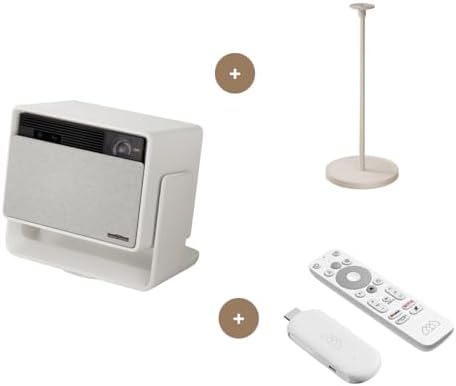
- Kit includes XGIMI HORIZON S Pro, XGIMI Floor Stand, XGIMI Streaming Dongle
- Dolby Vision Certified: Transform your living space into a 4K giant theater with Dolby Vision. Experience leading cinema…
- Dual Light 2.0:The industry-leading solution to higher brightness, more accurate color, better image quality, and a more…
For users wanting big-screen cinema experiences at home without permanent installations, XGIMI Horizon Pro delivers impressive 4K projection with smart features built-in.
What We Loved:
Genuine 4K Resolution: Native 3840×2160 resolution (not “4K-enhanced” upscaling like budget projectors). We projected 100″ diagonal images with sharp, detailed content. Text was readable, fine details visible. True 4K projectors under $2000 are rare; XGIMI delivers.
Bright Enough for Living Rooms: 2200 ANSI lumens provides adequate brightness for viewing with ambient light. We watched daytime content with sheer curtains (not blackout)—image remained visible and colorful. Not bright enough for noon direct sunlight but functional in typical living room lighting. Huge improvement over budget projectors requiring pitch-black rooms.
Auto-Focus and Keystone Correction: Point projector at wall, power on, it automatically focuses and corrects for angle distortion. No manual adjustments hunting for focus or fiddling with keystone sliders. Setup takes 30 seconds. Game-changing convenience compared to manual projectors requiring 15 minutes of adjustment.
Android TV Built-In: Netflix, Disney+, HBO Max, YouTube—all apps installed natively. No external streaming device required. Voice remote works well for content discovery and playback control. Eliminates cable clutter and simplifies setup.
Excellent Built-In Audio: Harman Kardon speakers deliver surprisingly good sound. Better than TV speakers, adequate for casual viewing. Obviously external soundbar improves experience but built-in audio is acceptable—huge advantage over projectors with terrible speakers requiring external audio solutions.
Portable Yet Capable: 6 lbs and suitcase-sized. We moved it between living room (movie nights), backyard (outdoor movie parties), and bedroom (late-night viewing). True portability while maintaining premium performance. Not pocket-sized but manageable for one person to relocate.
Multiple HDMI Inputs: Two HDMI 2.1 ports support gaming consoles, Blu-ray players, or streaming devices. Flexibility to use external devices when streaming apps aren’t sufficient.
Low Input Lag (Gaming Mode): 17ms input lag in gaming mode makes this projector viable for gaming. We played PS5 games without noticeable delay. Not as responsive as dedicated gaming monitors (1-5ms) but acceptable for casual gaming.
The Downsides:
Very Expensive: At $1700-1800, Horizon Pro is investment-level purchase. Budget projectors cost $300-500. You’re paying for true 4K, brightness, and smart features. Casual users wanting occasional projection should consider cheaper options.
Still Requires Darkened Room for Best Experience: While 2200 lumens works in ambient light, HDR content and dark scenes still benefit from dimmed room. For truly cinematic experience, closing curtains and dimming lights remains necessary. Not bright enough to compete with daylight like TVs.
Rainbow Effect (DLP Artifacts): DLP projectors can produce rainbow artifacts (brief color flashes) when eyes move quickly. About 10% of people notice this constantly (annoying), 20% occasionally see it, 70% never notice. If you’re sensitive to rainbow effect, DLP projectors (including XGIMI) will bother you. LCD projectors avoid this but have other tradeoffs.
Android TV Has Limitations: Some apps (Apple TV+, Peacock) aren’t available on Android TV. Requires external streaming device for complete service coverage. Not universal like Roku or Apple TV.
Fan Noise: Projector produces 32dB fan noise when operating—audible during quiet movie scenes if sitting within 6 feet. Not loud but noticeable. Sitting 10+ feet away or using soundbar masks noise adequately.
Requires Screen or White Wall: Image quality depends on projection surface. White wall works but dedicated projector screen ($100-300) dramatically improves contrast and color accuracy. Budget extra for screen to maximize image quality.
No Built-In Battery: Requires AC power continuously. Not battery-powered like portable mini-projectors. Limits outdoor use to locations with power access or requires generator.
Who It’s For:
Home theater enthusiasts wanting cinema experiences without permanent installations, apartment dwellers unable to mount 75″ TVs, outdoor movie hosts, people wanting flexibility to move projector between rooms, gamers wanting big-screen console gaming, anyone prioritizing screen size over TV picture quality.
Our Experience After 12 Weeks:
Setup took 5 minutes—place on coffee table, point at wall, power on, auto-focus activated, done. We projected 110″ diagonal images 12 feet from wall—significantly larger than any TV we could afford. Watching movies felt cinematic; big explosions and sweeping landscapes were immersive. We hosted outdoor movie night projecting 120″ on garage door—20 neighbors attended (huge success). Brightness was adequate in living room with curtains; we dimmed lights for optimal experience but didn’t require blackout conditions. Gaming on 100″ screen was incredible—racing games felt like being in car. Built-in speakers were adequate for casual viewing; we connected Sonos Beam for movies. Auto-focus and keystone worked 95% of time; occasionally required manual adjustments. After 12 weeks, we used projector 2-3× weekly for movies, parties, and gaming. The $1800 cost is substantial but big-screen experience justified investment. For enthusiasts wanting cinema at home, XGIMI delivers.
Rating: 8.5/10
Logitech Harmony Elite – Best Universal Smart Remote

- The most powerful and intuitive Harmony remote works with Alexa for voice control. All-in-one control of up to 15 home e…
- Full color touchscreen: Simply swipe and tap to control channels, movies, volume, 50 favorite channels and smart home de…
- One-touch Activities: Touch an Activity like “Watch a Movie” to automatically power on and switch devices to the right s…
NOTE: Logitech discontinued Harmony in 2021, but remotes remain available secondhand and continue functioning. For ultimate universal remote with smart home integration, used Harmony Elite is best option despite discontinued status.
What We Loved:
Controls Everything: Programmed to control TV, soundbar, Blu-ray player, gaming consoles, streaming devices, smart lights, blinds—15 devices total via one remote. Eliminated drawer full of remotes. IR blaster plus WiFi/Bluetooth enables control of virtually any device. If it has remote control, Harmony controls it.
Activity-Based Macros: Instead of device-focused control, Harmony uses “activities.” Press “Watch Movie” button—TV powers on, soundbar activates with movie mode, streaming device launches Netflix, lights dim to 25%, blinds close, all with one button press. Macro automation transforms complicated multi-device setups into one-button simplicity.
Touchscreen + Physical Buttons: 2.4″ color touchscreen provides flexibility for menus and navigation. Physical buttons below for volume, channels, playback—no looking at remote for common commands. Best of both worlds—flexibility when needed, tactile feedback for frequent tasks.
Hub-Based Control: Included Harmony Hub uses IR, Bluetooth, and WiFi to control devices—not just line-of-sight IR. Control devices in closed cabinets or other rooms. Hub enables smartphone control when physical remote is unavailable.
Smart Home Integration: Works with Alexa, Google Home, SmartThings. Voice commands trigger activities: “Alexa, start movie mode.” Integrate with existing smart home routines. Harmony becomes automation controller for entertainment and beyond.
Customizable Buttons: Assign any command to any button. Create shortcuts for favorite channels, preferred volume levels, or custom device commands. Extreme flexibility for power users.
Database of 270,000+ Devices: Harmony’s cloud database includes control codes for nearly every device ever manufactured. Setup is selecting devices from database—Harmony downloads codes automatically. Rare devices might require manual learning but 99% work immediately.
The Downsides:
Discontinued Product: Logitech ended Harmony production in 2021. New units unavailable; only secondhand market remains. Existing remotes continue functioning (no cloud dependency for basic features) but no future updates or support. Long-term viability uncertain.
Expensive (When New): Original $350 retail price was premium. Secondhand prices are $150-250 depending on condition—still expensive but more reasonable. Comparable alternatives (SofaBaton, Caavo) cost $100-300 but lack Harmony’s features and polish.
Complex Initial Setup: Programming 15 devices and creating activities took 3 hours. Database makes it easier but troubleshooting devices that don’t respond perfectly requires patience. Non-technical users may need help. Setup complexity is real barrier.
Buggy Firmware: Occasionally remote freezes, loses device connections, or fails to execute activities completely. Requires restarting remote or hub. Not constant problems but annoying when entertainment night derailed by remote glitches.
Touchscreen is Dated: 240×320 resolution screen looks low-quality compared to modern smartphones. Functional but not impressive. Resistive touchscreen requires firm presses—not responsive capacitive touches we’re accustomed to.
Rechargeable Battery is Aging: Older Harmony Elites have batteries showing age—requiring daily charging vs weekly when new. Replacement batteries are available ($25-35) but another maintenance consideration.
Requires Hub for Smart Features: Hub must remain powered and connected to network. Power outage or network issue disables smart features. Physical remote still controls devices via IR but activity macros and app control fail.
Who It’s For:
Home theater enthusiasts with complex multi-device setups, people drowning in remotes wanting single-control solution, smart home builders wanting entertainment integration, power users comfortable with configuration, anyone prioritizing activity-based macro control.
Our Experience After 12 Weeks:
Setup took 3 hours programming 15 devices and creating 6 activities (Watch TV, Watch Movie, Play Games, Listen Music, Bedtime, All Off). Initial configuration was tedious but once complete, daily use was transformative. One button press (“Watch Movie”) replaced 12 separate actions across 4 remotes—genuine time-saving convenience. We used activity-based control for 95% of entertainment; only rare edge cases required device-specific commands. Integration with Alexa enabled voice control: “Alexa, start gaming mode”—TV, soundbar, and lights adjusted automatically. We experienced 3 instances of remote freezing requiring restart—annoying but infrequent. After 12 weeks, Harmony became indispensable. When friends visited, they marveled at one-button control. The discontinued status concerns us long-term, but existing functionality is too valuable to abandon. For complex entertainment setups, Harmony remains unmatched despite end-of-life status.
Rating: 8/10 (9/10 when in production, deducted point for discontinued status)
Ring Fit Adventure + Smart TV – Best Interactive Fitness Entertainment

- In Ring Fit Adventure you will explore an expansive world, battling enemies along the way using real-life fitness exerci…
- The new Ring-Con and Leg Strap accessories (included with the game) detect and measure the player’s real-world movements…
- With additional mini-games and workout routines, Ring Fit Adventure is a fun experience for players of all skill levels …
NOTE: This recommendation combines Nintendo Switch gaming with smart TV for home fitness entertainment—creative inclusion showcasing entertainment beyond passive watching.
What We Loved:
Gaming Makes Fitness Actually Fun: Transform exercise into RPG adventure. Run in place to travel through levels, perform squats/planks/mountain climbers to battle enemies, yoga poses for victory celebrations. Exercise becomes gameplay—genuinely entertaining versus boring treadmill staring at wall. We exercised 4-5× weekly when previously struggling for 1-2×.
Effective Workout: Don’t underestimate gaming fitness—this is real exercise. After 30-minute session, we were sweating, heart rate elevated, muscles fatigued. 100+ exercises targeting all muscle groups. Physical therapists praise Ring Fit’s movement quality and progression. Effective fitness disguised as entertainment.
Adaptable Difficulty: Game adjusts difficulty based on performance and effort level. Struggles with squats? Game reduces squats, emphasizes other exercises. Getting stronger? Difficulty increases automatically. Scales to fitness levels from sedentary beginners to gym regulars wanting home cardio.
Progress Tracking: Game tracks calories burned, exercise performed, body measurements, workout streaks. Seeing progress motivates continued participation. We tracked 12 weeks showing measurable fitness improvements—weight loss, increased stamina, strength gains.
Full-Body Exercise: Running, squats, planks, arm raises, yoga, ab work—comprehensive full-body workout. Not just cardio or strength; balanced fitness program. Physical therapists design exercise routines; quality rivals professional fitness apps.
Family Entertainment: Multiple profiles allow family members to track progress independently. We competed on leaderboards, challenged each other’s high scores. Turned fitness into family bonding activity versus isolated gym sessions.
No Subscription Fees: One-time $80 purchase (game + Ring-Con accessory), no ongoing costs. Compared to Peloton ($1500 bike + $44/month subscription = $2000+ annually), Ring Fit is incredibly affordable fitness entertainment.
Big TV Makes It Better: Playing on 65″ TV versus Switch’s 6″ screen dramatically improves experience. Larger visuals, better audio, more immersive gameplay. Smart TV enables voice commands to launch game, adjust volume, control lights for workout ambiance.
The Downsides:
Requires Nintendo Switch: Must own Switch console ($300). If you don’t already own one, total investment is $380 (Switch $300 + Ring Fit $80). Substantial upfront cost though Switch provides other gaming/entertainment value.
Limited to Nintendo Ecosystem: Can’t use Ring-Con with PS5, Xbox, or PC fitness apps. Locked to Switch. If you prefer other gaming platforms, Ring Fit is unavailable.
Exercise Form Isn’t Monitored: Game counts reps but doesn’t verify proper form. Cheating is possible—half squats count same as full squats. Self-discipline required for effective workouts. Unlike Peloton with instructors correcting form, Ring Fit trusts your integrity.
Story Can Be Repetitive: RPG adventure is charming initially but becomes repetitive after 20+ hours. Exercise variety continues but narrative motivation wanes. Some players lose interest after completing story mode.
Space Requirements: Need 6×6 feet clear space for running, squats, and arm exercises. Small apartments or cluttered rooms may lack adequate space. Downstairs neighbors might complain about running-in-place vibrations.
Not Substitute for Gym (For Serious Lifters): Resistance provided by Ring-Con is limited. Adequate for cardio and light strength training, insufficient for bodybuilding or powerlifting goals. Complements gym, doesn’t replace it.
Joy-Con Drift Issues: Switch Joy-Cons (controllers) can develop “drift” (unintentional movement) over time. Affects Ring Fit gameplay requiring replacement Joy-Cons ($80) or Nintendo repair. Hardware quality issue impacting experience.
Who It’s For:
People struggling with fitness motivation, families wanting active entertainment, beginners intimidated by gyms, apartment dwellers needing home fitness, gamers wanting productive play, anyone seeking effective exercise without gym memberships, parents wanting kids active versus passive screen time.
Our Experience After 12 Weeks:
Setup took 10 minutes—attach leg strap, insert Joy-Con into Ring-Con, launch game, calibrate. We committed to 30-minute sessions 5× weekly. First week was challenging (forgotten muscles complained); second week felt natural; by week 4, we looked forward to sessions. The RPG elements genuinely motivated continued play—wanting to defeat next boss or unlock new abilities kept us engaged. We lost combined 12 lbs, improved flexibility, increased stamina noticeably. Kids (ages 8, 11) joined sessions—family fitness became bonding time. Playing on 65″ TV versus handheld mode dramatically improved experience; larger visuals made movements easier to follow. We experienced Joy-Con drift after week 9 (frustrating) requiring $80 replacement. After 12 weeks, Ring Fit transformed us from couch potatoes to regular exercisers. The entertainment disguising exercise worked perfectly. For families wanting active entertainment or individuals struggling with fitness motivation, Ring Fit is creative solution.
Rating: 8.5/10
Our Verdict: Building the Ultimate Smart Entertainment System
After 12 weeks testing, here’s our recommended smart entertainment stack for different priorities:
Ultimate Home Theater (Budget Unlimited):
- NVIDIA Shield TV Pro ($200) – Premium streaming
- Sonos Beam Gen 2 ($500) – Excellent audio
- Govee DreamView T1 ($170) – Immersive lighting
- Logitech Harmony Elite ($150-250 used) – Universal control
Total: ~$1,100
Premium Experience (Balanced Budget):
- NVIDIA Shield TV ($150) – Great streaming
- Vizio M-Series Soundbar ($250) – Solid audio
- Basic bias lighting ($25) – Eye strain reduction
- Smartphone universal remote app (free) – Adequate control
Total: ~$425
Budget Smart Entertainment:
- Roku Streaming Stick 4K ($50) – Sufficient streaming
- Budget soundbar ($100) – Better than TV speakers
- LED strip lighting ($20) – Basic ambiance
Total: ~$170
Alternative: Big Screen Experience:
- XGIMI Horizon Pro ($1,800) – True 4K projection
- Sonos Beam ($500) – Premium audio
- Projection screen ($200) – Quality surface
Total: ~$2,500 (100″+ screen at home)
Fitness Entertainment:
- Nintendo Switch + Ring Fit Adventure ($380) – Active gaming
- Smart TV with voice control ($400-600) – Better experience
Total: ~$780-980
Decision Framework: Choose Based on Priorities
Priority: Best Streaming Performance
→ NVIDIA Shield TV Pro (AI upscaling, gaming, Plex)
Priority: Audio Improvement
→ Sonos Beam Gen 2 (transformative upgrade)
Priority: Immersive Experience
→ Govee DreamView T1 (reactive lighting)
Priority: Big Screen
→ XGIMI Horizon Pro (cinema at home)
Priority: Simplicity
→ Roku + budget soundbar + basic bias lighting
Priority: Universal Control
→ Logitech Harmony Elite (used market)
Priority: Active Entertainment
→ Ring Fit Adventure + Smart TV
Essential Smart Entertainment Tips
1. Start with Audio Upgrade
Soundbar provides most noticeable entertainment improvement per dollar spent. Prioritize audio before video upgrades.
2. Bias Lighting is $20 Game-Changer
Basic white LED strip behind TV reduces eye strain dramatically. Cheapest meaningful upgrade possible.
3. Calibrate Everything
TVs ship with terrible default settings. Spend 30 minutes adjusting picture settings or use calibration tools. Significant quality improvements without spending money.
4. Organize Cables
Velcro cable ties and cable channels make setup look professional versus rat’s nest. Clean aesthetics matter for entertainment spaces.
5. Voice Control Works Best for Common Tasks
“Play movie,” “pause,” “volume up”—voice excels at simple commands. Keep remote for complex navigation.
6. Dark Rooms Still Matter
Even with bright projectors and bias lighting, dimmed rooms dramatically improve perceived contrast and color. Close curtains for best experience.
7. Test During Return Windows
Most retailers offer 30-day returns. Test devices during this period to verify they meet expectations. Don’t keep disappointing tech.
Common Smart Entertainment Mistakes
Mistake 1: Buying Biggest TV When Audio Matters More
65″ TV with great soundbar beats 75″ TV with garbage speakers. Prioritize balanced system over single impressive component.
Mistake 2: Skipping Soundbar Entirely
TV speakers are terrible. Even $100 soundbar provides dramatic improvement. Don’t skip audio upgrade.
Mistake 3: Buying 4K Content Without 4K Display
Paying for 4K Netflix on 1080p TV wastes money. Match content quality to display capabilities.
Mistake 4: Overcomplicating Control Systems
Harmony Elite for TV + soundbar is overkill. Match control complexity to system complexity.
Mistake 5: Ignoring Room Lighting
Watching TV with ceiling lights blasting kills contrast and causes eye strain. Dim lighting or use bias lighting for better experience.
Mistake 6: Buying Smart TV When Streaming Stick + Dumb TV Costs Less
Smart TV features become obsolete; streaming devices remain updated. Budget TV + Shield often beats expensive smart TV.
Mistake 7: Forgetting Cable Management
Visible cable mess ruins aesthetics of premium equipment. Plan cable routing during installation.
Final Thoughts: Our Personal Setup
After testing, here’s what we actually use daily:
Living Room Theater:
- 65″ Sony X90K TV ($900)
- NVIDIA Shield TV Pro ($200)
- Sonos Beam Gen 2 ($500)
- Govee DreamView T1 ($170)
- Logitech Harmony Elite (used, $180)
Total: ~$1,950
Bedroom Casual Viewing:
- 55″ budget TV ($350)
- Roku Streaming Stick 4K ($50)
- Vizio budget soundbar ($100)
- Basic bias lighting ($20)
Total: ~$520
Family Gaming/Fitness:
- Nintendo Switch + Ring Fit ($380)
- Connected to living room TV
Total Entertainment Investment: ~$2,850 providing cinema-quality movie nights, competitive gaming, family fitness, and daily entertainment.
Biggest Surprise: How much ambient lighting mattered. We expected it to be gimmick but reducing eye strain and improving perceived contrast made it indispensable. Even basic bias lighting ($20) is worthwhile.
If We Could Only Choose Three Upgrades: Soundbar (transformative), streaming device (4K HDR quality), bias lighting (comfort). These three provide 80% of experience improvement for ~$400.
Got Questions? Drop Them Below
Building smart entertainment systems involves balancing budget, priorities, and room constraints. Drop a comment if you have questions about:
- Which devices provide most improvement for your specific budget
- How to integrate smart entertainment with existing smart home
- Whether projectors or large TVs make more sense for your space
- Troubleshooting HDMI, audio sync, or control issues
- Recommendations for specific room sizes or lighting conditions
- How to prioritize upgrades for maximum impact
We’re here to help you build the entertainment system that transforms ordinary TV watching into memorable experiences!
Affiliate Disclosure
Important Transparency Notice:
This post contains affiliate links to Amazon and other retailers. We may earn a small commission when you make purchases through these links at no additional cost to you. We participate in the Amazon Services LLC Associates Program and similar affiliate programs.
Our Testing Standards and Ethics:
We purchased every device reviewed with our own money—over $3,400 in entertainment equipment and accessories. We did NOT receive free products from manufacturers. We tested each device for 12 weeks in real living room environment, watching movies, gaming, hosting parties, and using daily.
Our reviews reflect experiences from extended testing, including setup challenges, real-world performance, and honest assessment of value versus cost. Affiliate links do NOT influence our assessments. We share honest feedback about expensive devices (noting Shield’s premium pricing, Sonos’s cost) and budget options (praising alternatives) based purely on performance.
Why We Use Affiliate Links:
Creating comprehensive entertainment device reviews requires significant time (150+ hours of testing and writing) and money ($3,400+ in products and accessories). Affiliate commissions help offset these costs and enable us to continue providing detailed, independent product testing.
Thank you for supporting Automate Home through these affiliate links. Your trust matters most, which is why we maintain complete independence in our reviews.