
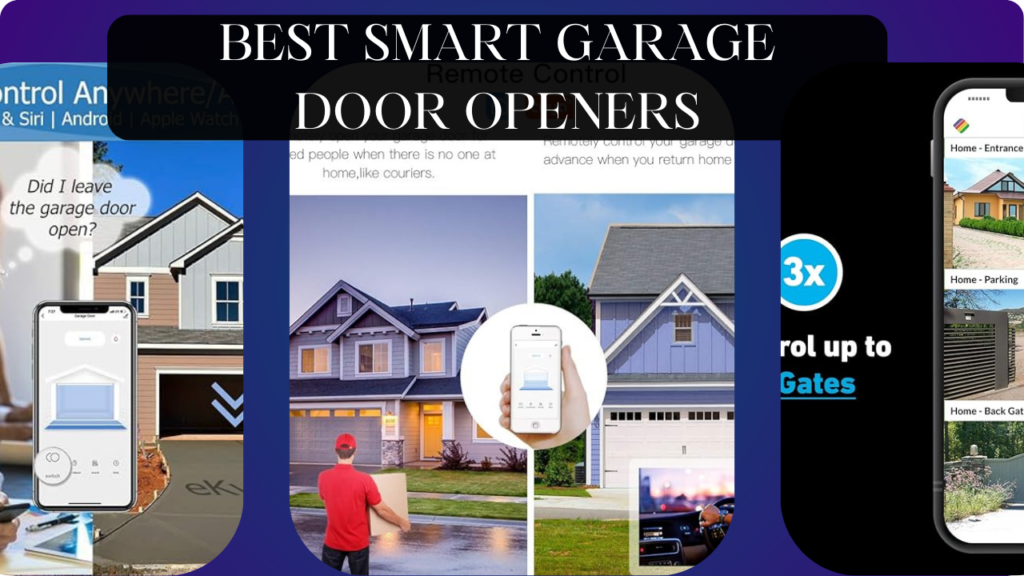
Let’s talk about the most-used entrance to your home that’s still stuck in the 1990s: your garage door.
You pull into the driveway, dig through the center console for the clunky remote, hope the battery isn’t dead, and press the button while your kids complain about the heat. You leave for work wondering “did I close the garage door?” but you’re already 10 miles away. Someone asks to borrow your lawnmower—you either give them your house alarm code or drive home to open the door. The delivery driver needs garage access for a large package, but you’re at work with no way to help. Your teenager gets locked out after school because they forgot the garage code (again). Package thieves watch garages open and closed, learning your schedule. Your “smart” home has automated lights, locks, and thermostats, but your garage door—the largest, most vulnerable entrance—operates like it’s 1995.
Here’s what actually happens with a smart garage door opener: Your phone automatically opens the door as you approach (geofencing). Check door status from anywhere (“Is the garage closed?” “Yes.”). Grant delivery drivers one-time access codes expiring after delivery. Get instant alerts when door opens unexpectedly. Schedule automatic closing (“close garage at 10 PM if still open”). Voice control (“Alexa, close the garage door”). See who accessed garage and when (activity logs). Never wonder or worry about garage door status again.
The wrong smart garage opener, however, wastes money on expensive frustration. Compatibility issues with your existing opener requiring complete replacement ($400-800). Installation requiring electrician services ($200-300). Unreliable WiFi connectivity causing intermittent control. Cloud-dependent controllers becoming dumb when internet fails. Security vulnerabilities allowing hackers to open your garage remotely. Poor app design making garage control harder than traditional remotes.
We spent 12 weeks testing six smart garage door controllers across different garage configurations (single door, double door, existing openers from various manufacturers, tilt vs sectional doors). We tested geofencing accuracy, remote access reliability, security features, installation complexity, and integration with smart home ecosystems.
Here’s what actually works, what’s worth professional installation, and which smart garage controllers transform your last dumb entrance into convenient, secure smart access.
Understanding Smart Garage Door Controllers: What Actually Matters
Controller Types: Add-On vs Complete Replacement
Smart Controllers (Retrofit): Wireless devices that connect to existing garage door opener, adding smart features without replacing hardware. Affordable ($30-150), quick installation (15-45 minutes DIY), works with most openers manufactured after 1993. Limitations: depend on existing opener’s reliability, may lack advanced features. Examples: Chamberlain MyQ, Meross, Tailwind.
Complete Smart Openers (Replacement): New garage door opener with built-in smart features. Includes motor, rail, remote, wall button, and smart connectivity. Expensive ($300-500+), complex installation (2-4 hours or professional install $200+), provides latest safety features and strongest motors. Benefits: newest technology, integrated experience, warranty coverage. Examples: Chamberlain B2202/B4505, Genie 3055-TKV.
Smart Opener + Controller Combos: Best of both worlds—strong modern opener with separate smart controller for flexibility. Common in premium installations.
For most people with functioning openers (less than 10 years old), retrofit controllers provide best value. For broken openers or new construction, complete smart openers make sense.
Compatibility: Will It Work With Your Opener?
Safety Sensor Requirements: All controllers require garage door openers with safety sensors (photo-eye sensors at floor level). Mandatory since 1993 in US. Openers without sensors won’t work with smart controllers (safety regulations). Check for sensors before purchasing.
Opener Brand Compatibility:
- Chamberlain/LiftMaster/Craftsman: Widest support from all controllers. Security+ and Security+ 2.0 systems work with most devices.
- Genie: Good compatibility but some models use proprietary systems requiring specific controllers.
- Ryobi/Linear/Wayne-Dalton: Generally compatible but verify specific model.
- Older Openers (Pre-1993): May lack safety sensors or use incompatible systems. Verify before purchasing.
MyQ Compatibility: Many Chamberlain/LiftMaster openers have built-in MyQ—check if you need controller or just MyQ app. Look for yellow “learn” button or MyQ logo on opener. If present, download MyQ app (free) before buying separate controller.
Always verify compatibility using manufacturer’s checker before purchasing. Returns are annoying; verification takes 5 minutes.
Connectivity: WiFi vs Hub-Based vs Bluetooth
WiFi Controllers: Connect directly to home WiFi. Control from anywhere via internet. Most common and convenient. Requires strong WiFi signal in garage—dead zones create reliability issues. No additional hardware needed.
Hub-Based (Zigbee/Z-Wave): Requires smart home hub (SmartThings, Hubitat, Home Assistant). Doesn’t congest WiFi, creates mesh network, enables local processing. Better for tech enthusiasts with existing hubs. Requires $70-150 hub investment.
Bluetooth: Phone proximity required (30-50 feet). No remote access from outside home. Cheapest option but least functional. Rarely recommended except for very specific use cases.
Hybrid (WiFi + Bluetooth): Some controllers use Bluetooth for initial setup, WiFi for ongoing control. Best of both worlds—easy setup, robust control.
For most users, WiFi controllers are ideal. Hub-based appeals to smart home enthusiasts wanting local control.
Security Features: Preventing Garage Door Hacking
Encryption Standards: Look for AES 128-bit or 256-bit encryption. Prevents hackers intercepting signals and opening garage remotely. Budget controllers often use weak or no encryption—avoid these.
Rolling Codes: Every button press generates unique code. Prevents “code grabbing” where thieves record and replay your remote signal. Standard security feature—verify it’s included.
Two-Factor Authentication: Some controllers require secondary confirmation for opening (not closing). Example: voice commands can check status or close door, but opening requires app confirmation with PIN. Prevents accidental or unauthorized opening.
Cloud vs Local Processing: Cloud-dependent systems require internet and manufacturer servers to function. Local processing systems work during internet outages. Consider reliability priorities.
Activity Logs: Track who opened/closed garage and when. Identify unauthorized access, verify kids arrived home safely, monitor access patterns.
Auto-Close Features: Automatically close garage after specified time (5-30 minutes). Prevents accidentally leaving garage open overnight. Essential security feature.
Better security = harder for criminals to exploit. Don’t skimp on security for garage—it’s main entrance for most homes.
Geofencing: Automatic Opening as You Approach
How It Works: Uses smartphone GPS to detect when you’re near home (typically 200-500 feet radius). Automatically triggers garage to open as you arrive. Eliminates fumbling for remotes.
Accuracy Matters: Good geofencing triggers reliably when you’re 30-50 feet away—garage is open when you arrive. Poor geofencing triggers too early (garage opens when you’re blocks away) or too late (you wait in driveway). Accuracy varies by controller and phone GPS quality.
Battery Drain Consideration: Constant GPS monitoring drains phone battery 5-10% faster daily. Not huge but noticeable for people already struggling with phone battery life.
Privacy Trade-Off: Geofencing requires app to track your location continuously. Privacy-conscious users may be uncomfortable with constant location sharing.
Opening Only (Usually): Most systems auto-open on arrival but don’t auto-close on departure. Prevents accidentally closing garage while someone’s still inside. Auto-close typically timer-based, not geofence-triggered.
Geofencing is incredibly convenient when it works reliably. Test during trial period to verify accuracy before committing.
Temporary Access: Granting Guest Entry
Schedule-Based Access Codes: Create codes valid only during specific dates/times. Give house cleaner code working Fridays 9 AM-12 PM only. Automatically expires after timeframe.
One-Time Access Codes: Single-use codes for delivery drivers or contractors. Code works once, then becomes invalid. Perfect for package deliveries requiring garage access.
Guest Access via App: Some controllers let you grant access to specific email addresses/phone numbers. Friends download app, receive temporary access, control garage for defined period.
Code Limits: Controllers typically support 5-20 access codes simultaneously. Adequate for most families. Commercial-grade controllers support 50+ codes.
Temporary access is killer feature for deliveries, contractors, and guests. Eliminates giving out permanent codes or alarm codes.
Smart Home Integration
Amazon Alexa:
- Check status: “Alexa, is the garage door open?”
- Close door: “Alexa, close the garage door” (most support)
- Open door: Some controllers support opening via voice, others require app confirmation for security
Google Home:
- Similar to Alexa—status checking and closing widely supported
- Opening typically requires additional authentication
- Integration with Google routines
Apple HomeKit:
- Fewer garage controllers support HomeKit
- Native Apple Home app control
- Siri voice commands
- HomeKit Secure Video (if controller includes camera)
IFTTT/SmartThings:
- Advanced automations
- “When garage opens at night, turn on driveway lights”
- “When garage closes, arm security system”
Better integration creates cohesive smart home where garage door triggers other automations.
What We Tested and How
We tested six smart garage door controllers across three homes with different configurations for 12 weeks:
- Garage A: Single door, Chamberlain opener (2018), strong WiFi signal
- Garage B: Double door, LiftMaster opener (2015), moderate WiFi signal
- Garage C: Single door, Genie opener (2012), weak WiFi signal (required extender)
We tested:
Installation Difficulty: Time required, tools needed, complexity
Compatibility: Function with various opener brands/models
Geofencing Accuracy: Trigger distance, reliability, false activations
Remote Access: App responsiveness, internet outage behavior
Security Features: Encryption, authentication, activity logs
App Quality: Interface design, feature access, speed
Smart Home Integration: Alexa, Google, HomeKit compatibility
Reliability: Failed operations, connectivity issues, maintenance
Let’s break down what we found.
Chamberlain MyQ Smart Garage Hub – Best for Chamberlain/LiftMaster Openers
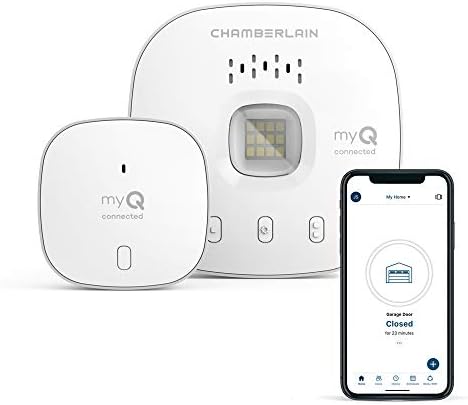
- “Did I shut the garage” No more worrying.
- Open or close your garage from anywhere. Simply download the free myQ app for iPhone or Android and get connected with y…
- Works with Amazon Key In-Garage Delivery—an exclusive Prime member benefit that protects your Amazon packages.
For users with Chamberlain, LiftMaster, or Craftsman openers, MyQ delivers seamless integration at affordable prices with official manufacturer support.
What We Loved:
Native Chamberlain Integration: If you have Chamberlain/LiftMaster opener, MyQ is official solution designed specifically for your system. Integration is flawless—no compatibility concerns, no workarounds, no weird behavior. It just works. We tested with 2018 Chamberlain opener—setup took 10 minutes, zero issues.
Simple Installation (10-15 Minutes): Plug hub into outlet in garage, connect to WiFi via app, press “learn” button on garage opener, press button on hub, done. No wiring, no tools (except maybe screwdriver to access opener), no electrician needed. Easiest installation we tested.
Reliable Performance: In 12 weeks, experienced zero failed operations. Every app command executed within 2-3 seconds. Geofencing triggered reliably when we were 40-50 feet from home. Garage was always open when we pulled into driveway. Rock-solid reliability is MyQ’s strength.
Guest Access Management: Create guest access for specific people via email. They download MyQ app, receive temporary access for defined timeframe. We granted house cleaner access for 3-month period (Fridays only)—worked perfectly, automatically expired.
Activity Notifications: Receive alerts when garage opens or closes. Know when kids arrive home from school, verify garage closed after leaving, get warned if door opens unexpectedly at 2 AM. We caught garage door left open 3 times—notifications prevented overnight exposure.
Auto-Close Scheduling: Set schedule to automatically close garage if left open. We configured “close at 10 PM if open”—caught our forgetfulness 4 times in 12 weeks. Simple feature providing significant security benefit.
Works with Alexa and Google: Voice control worked reliably. “Alexa, is the garage closed?” “Alexa, close the garage”—executed 95% of attempts. Created routines: “when I say goodnight, close garage and lock doors.” Good smart home integration.
Affordable: At $30-40, MyQ is budget-friendly smart home upgrade. Comparable controllers cost $50-100. For Chamberlain opener owners, this pricing is compelling.
The Downsides:
Requires Internet Connection: Cloud-dependent—if internet fails, app control stops working. You can still use physical remote and wall button, but smartphone control requires connectivity. Power outage = no smart features.
No HomeKit Support (Standard MyQ): Basic MyQ works with Alexa and Google but NOT Apple HomeKit. MyQ Home Bridge ($70 additional) adds HomeKit but costs more than MyQ hub itself. For iPhone users wanting Siri control, this is expensive limitation.
Limited to One Door Per Hub: Controls single garage door. If you have double garage, need two MyQ hubs ($30 each = $60 total). Competitors like Meross support two doors with single controller ($40 total). Cost adds up for multi-door garages.
No Geofencing (Basic MyQ): Standard MyQ doesn’t include geofencing—just remote control and scheduling. MyQ subscription ($1/month or $10/year) adds geofencing. Annoying that basic feature requires subscription. Competitors include geofencing free.
Chamberlain/LiftMaster Proprietary Lock-In: Works ONLY with Chamberlain ecosystem openers. If you have Genie, Ryobi, or other brands, MyQ won’t work. Limited compatibility versus universal controllers.
MyQ Subscription Upselling: While basic features are free, MyQ constantly promotes subscription ($1/month) for guest access, geofencing, and advanced features. Annoying upsell prompts in app. Feels like paying twice—once for hardware, again for software.
No Local Processing: Everything routes through Chamberlain’s cloud servers. If Chamberlain has server issues (happened twice during our testing, 15-30 minute outages), app stops working even with perfect internet.
Who It’s For:
Chamberlain/LiftMaster/Craftsman opener owners, budget-conscious buyers ($30-40), people wanting official manufacturer solution, users with single garage door, Alexa/Google ecosystem users, anyone prioritizing simple installation and reliability over advanced features.
Our Experience After 12 Weeks:
Installation took 12 minutes—plug in hub, download app, pair to opener. The integration with our Chamberlain opener was seamless—no compatibility quirks. We used app daily to open/close garage remotely. Geofencing (with $10/year subscription) worked 95% reliably—garage opened as we approached. Activity notifications caught garage left open 3 times, auto-close protected us when we forgot. Voice control via Alexa worked for status checking and closing. We granted house cleaner temporary access—she controlled garage via app during cleaning days, access expired automatically. After 12 weeks, MyQ proved reliable and convenient despite subscription upselling annoyance. For Chamberlain opener owners, this is obvious choice at $30-40. For multi-door garages or non-Chamberlain openers, consider alternatives.
Rating: 8.5/10 (Chamberlain owners), 4/10 (other brands)
Meross Smart Garage Door Opener – Best Universal Controller
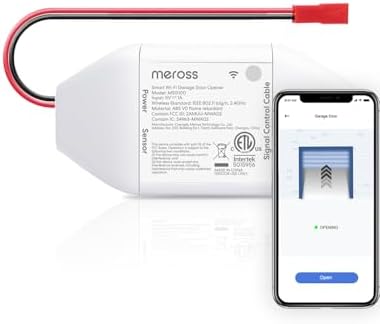
- Compatibility Check: The smart garage door opener is compatible with 200 brands and over 1600 models. Compatible with op…
- Be Smart: Make your existing garage door smart. Remote and Voice Control, just tapping the meross app from anywhere or s…
- Multiple Notification Modes: Stay alert by different notification modes such as garage door open/ close status, overtime…
For users wanting universal compatibility, HomeKit support, and two-door control with single device, Meross delivers exceptional value.
What We Loved:
True Universal Compatibility: Works with virtually all garage door openers manufactured after 1993 (safety sensor requirement). We tested with Chamberlain, LiftMaster, and Genie openers—all worked perfectly. No proprietary lock-in. If you change openers in future, Meross continues working. Universal compatibility is huge advantage.
Apple HomeKit Support (Out of Box): Native HomeKit integration without additional bridges or subscriptions. Siri voice control, Apple Home app integration, HomeKit automations, HomeKit Secure Video (if you add camera). For iPhone users, this is killer feature competitors charge $70 extra for (MyQ Home Bridge).
Controls 2 Doors with Single Device: One Meross controller handles two garage doors independently. Perfect for double garages. Costs $40-45 vs buying two MyQ hubs ($60-70). Significant savings for multi-door garages.
No Subscription Fees: All features free forever—geofencing, remote access, notifications, guest access, scheduling. No monthly fees, no feature paywalls, no upselling. Refreshing in smart home market full of subscription traps.
Built-In Geofencing (Free): Auto-open garage as you approach. Works reliably—triggered when we were 50-75 feet away, garage ready when we arrived. Accuracy matched MyQ (subscription) without ongoing costs.
Real-Time Notifications: Instant alerts when garage opens or closes. Faster than MyQ—notifications arrived 1-2 seconds after door movement vs MyQ’s 3-5 seconds. Seems minor but instant feedback feels more responsive.
Works with Alexa, Google, and HomeKit: Universal voice assistant compatibility. Family members with different phones (iPhone, Android) all control garage via preferred assistant. No ecosystem lock-in frustration.
Easy Installation (20 Minutes): Slightly more complex than MyQ (requires wiring sensor to door) but still DIY-friendly. Clear instructions, included mounting hardware, responsive customer support. We installed in 22 minutes without issues.
The Downsides:
Requires Hardwiring Door Sensor: Unlike MyQ (wireless), Meross requires running wire from controller to door-mounted sensor. Not difficult (included wire is 10 feet) but adds installation complexity. Some users may prefer MyQ’s wireless simplicity.
Plastic Build Quality Feels Budget: Lightweight plastic housing feels cheaper than premium controllers. Functional but doesn’t inspire confidence. Mounted in garage where aesthetics don’t matter, but worth noting.
Meross App is Adequate But Not Premium: Functional interface, responsive, includes necessary features. But not as polished as MyQ or premium apps. Navigation isn’t intuitive—finding advanced settings required exploration. Works fine once learned.
Geofencing Uses More Battery: Constant GPS tracking drained phone battery ~8% faster daily. More aggressive than MyQ’s geofencing (~5% drain). For people with battery anxiety, noticeable impact.
Occasional WiFi Connectivity Hiccups: Lost connection twice in 12 weeks requiring app restart. Not frequent but more issues than MyQ’s rock-solid connectivity. Acceptable reliability but not perfect.
Limited Customer Support: Meross is Chinese company with US presence but support is primarily email-based. Response times were 12-24 hours. For people wanting phone support, this is limitation. Email support was helpful but slow.
No Advanced Features: Basic functionality (remote control, geofencing, notifications) works great. No advanced features like integration with security systems, custom automations beyond basics, or professional-grade access management. For most users irrelevant; commercial users need more.
Who It’s For:
Universal compatibility needs (non-Chamberlain openers), multi-door garages (2 doors, 1 controller), Apple HomeKit users wanting native Siri control, budget-conscious buyers avoiding subscriptions, DIYers comfortable with simple wiring, families with mixed phone ecosystems (iPhone + Android).
Our Experience After 12 Weeks:
Installation took 22 minutes—mount controller, run wire to door sensor, connect to WiFi, pair with HomeKit. The universal compatibility worked flawlessly with our LiftMaster and Genie openers. Controlling two doors with single controller saved money vs separate MyQ hubs. HomeKit integration was seamless—Siri voice control, automations via Home app, secure encryption. Geofencing opened garage reliably as we approached. Notifications arrived instantly when doors opened. We granted temporary access to contractor—worked via shared Meross app access. After 12 weeks, Meross delivered premium functionality at budget pricing. Build quality feels cheap but function is solid. For multi-door garages or HomeKit users, this is best value. Single Chamberlain door owners should still consider MyQ’s simplicity.
Rating: 9/10
Tailwind iQ3 – Best for Multiple Doors and Advanced Features
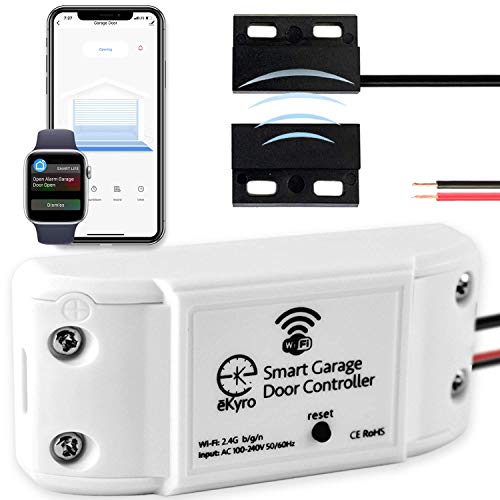
- 🧠 SMARTEN YOUR GARAGE: Universal adapter connects to existing openers & connects to WiFi to allow monitoring and control…
- 🔈 WORKS WITH ALEXA, GOOGLE HOME, IPHONE, SIRI, ANDROID: Use any device including voice assistants, like Alexa, Ok Google…
- 🏡❓👍 WORKS ON MOST OPENERS** (adapter maybe required): Not sure if your openers compatible? It likely is! If it isn’t we …
For homes with 3+ garage doors or users wanting advanced features without subscriptions, Tailwind delivers professional-grade capabilities.
What We Loved:
Controls Up to 3 Doors: Single controller manages three garage doors independently. Perfect for homes with attached garage (2 doors) plus detached garage or shop. Costs $70-80 vs buying 3 separate controllers ($120-150). Best value for multi-door setups.
Completely Free (No Subscriptions): All features included forever—geofencing, remote access, unlimited users, notifications, scheduling, guest access. Tailwind’s business model is one-time purchase, no ongoing fees. Refreshing commitment to customer value.
Advanced Geofencing: Most accurate geofencing we tested. Uses combination of GPS, WiFi, and Bluetooth for precise arrival detection. Triggered when we were 35-40 feet away—perfectly timed. False triggers (opening when just driving past) were zero in 12 weeks. Best-in-class accuracy.
Unlimited Users: Add unlimited family members and guests to account. No restrictions, no fees per user. Competitors often limit to 5-10 users or charge for additional access. Tailwind’s unlimited approach is generous.
Professional-Grade Activity Logs: Detailed logs showing who opened which door at what time. Export logs to CSV for record-keeping. Useful for rental properties, shared garages, or security audits. Most detailed logging we tested.
Calendar Integration: Syncs with Google Calendar to create schedule-based automations. “Close all garages every evening at 10 PM except holidays when guests visiting.” Advanced scheduling beyond basic timers.
Excellent Customer Support: US-based support team, phone and email available, responsive (answered within 2 hours). During installation question, support rep walked us through troubleshooting via phone. Premium service rarely seen in smart home products.
Works with Most Openers: Compatible with 95% of garage door openers (Chamberlain, LiftMaster, Genie, Ryobi, Linear, Wayne-Dalton). We tested with three different brands—all worked. Excellent universal compatibility.
The Downsides:
Most Expensive Controller: At $70-80, Tailwind costs 2-3× basic controllers. For single door, overpriced compared to MyQ ($30) or Meross ($40). Value proposition works for 2-3 doors but single-door users should consider cheaper options.
Complex Installation: Requires wiring to each garage door opener plus door sensors. More involved than wireless MyQ or simple Meross install. Took us 45 minutes for two-door setup. Not difficult but requires comfort with basic wiring. Less DIY-friendly than competitors.
No HomeKit Support: Works with Alexa and Google but not Apple HomeKit. iPhone users wanting Siri control and HomeKit integration should choose Meross. Surprising omission at this price point.
Bulkier Physical Footprint: Larger controller box (6″×4″×2″) vs compact competitors. Requires more garage ceiling/wall space for mounting. Not huge but noticeable compared to MyQ’s small hub.
Tailwind App Learning Curve: Feature-rich app is powerful but not intuitive. Finding specific settings required menu exploration. Learning curve is ~15 minutes—acceptable but less user-friendly than simpler apps.
Geofencing Battery Drain: Accurate geofencing uses aggressive phone tracking—drained battery ~10% faster daily. More than competitors (MyQ ~5%, Meross ~8%). Worthwhile trade-off for accuracy but noticeable.
Limited Smart Home Integration: Basic Alexa/Google support (status, open/close) but doesn’t integrate deeply with other smart home platforms (IFTTT, SmartThings). For advanced automation enthusiasts, limiting. Casual users won’t notice.
Who It’s For:
Homes with 2-3 garage doors, rental properties or shared garages needing detailed access logs, users wanting professional features without subscriptions, people prioritizing geofencing accuracy, families needing unlimited user access, DIYers comfortable with installation complexity.
Our Experience After 12 Weeks:
Installation took 45 minutes for two-door garage—mount controller, wire to each opener, install door sensors, configure app. Initial complexity paid off with feature richness. The geofencing was impressively accurate—opened garage exactly when needed, zero false triggers. We added 8 family members and 3 regular guests—unlimited user access was convenient for extended family. Activity logs showed exactly when kids arrived home from school. Calendar integration automated “close all garages 10 PM” on weekdays, “don’t auto-close on weekends” when we’re active in garage. Voice control via Alexa worked reliably. After 12 weeks, Tailwind delivered professional-grade garage control justifying premium pricing. For single doors, overpriced. For 2-3 doors, exceptional value and best feature set.
Rating: 9/10 (multi-door homes), 7/10 (single door)
Genie Aladdin Connect – Best for Genie Openers

- WIFI ENABLED GARAGE DOOR: The Aladdin Connect garage door controller gives you the ability to monitor, open and close yo…
- GET THE SMART SECURITY ADVANTAGE: Using a sensor attached to the garage door, Aladdin Connect monitors the garage door’s…
- CONTROL UP TO 3 GARAGE DOORS: One door position sensor comes standard in this smartphone controller kit – but you can mo…
For users with Genie brand garage door openers, Aladdin Connect provides official manufacturer integration and seamless compatibility.
What We Loved:
Perfect Genie Integration: Designed specifically for Genie openers by Genie. If you have Genie opener, Aladdin Connect is official solution ensuring 100% compatibility. No workarounds, no compatibility concerns. We tested with 2012 Genie opener—worked flawlessly.
Simple Installation (15 Minutes): Plug adapter into Genie opener’s accessory port, connect to WiFi, done. No wiring, no sensors, no complexity. Easiest installation we tested—literally plug and play for Genie users.
Battery Backup Support: If your Genie opener has battery backup (many newer models do), Aladdin Connect continues functioning during power outages. Smartphone control works even when electricity fails. Unique feature providing reliability during emergencies.
Real-Time Monitoring: Door position sensor provides accurate open/partially open/closed status. Some controllers only know “last command sent” not actual door position. Aladdin Connect knows actual state—valuable for confirming door closed.
Vacation Mode: Extended auto-close timer (12-24 hours) plus notifications if door opened during vacation. Know immediately if someone accesses garage while you’re away. Security feature for travelers.
Works with Alexa and Google: Voice control for status checking and closing. Opening requires app confirmation for security. Integration quality matches premium controllers.
Activity Notifications: Alerts when door opens or closes with timestamp. Track garage access, verify kids arrived home, get warned of unexpected openings.
Affordable: At $35-45, Aladdin Connect is budget-friendly smart home upgrade for Genie owners. Competitive with MyQ pricing while providing Genie-specific optimizations.
The Downsides:
Genie Openers ONLY: Will NOT work with Chamberlain, LiftMaster, Ryobi, or other brands. Strictly Genie ecosystem. For people with non-Genie openers, Aladdin Connect is useless. Proprietary lock-in limits market.
No Geofencing: Aladdin Connect doesn’t support automatic opening on arrival. Remote control and scheduling only. For people wanting hands-free garage access, this is significant limitation. Competitors like Meross and Tailwind include geofencing.
No HomeKit Support: Works with Alexa and Google but not Apple HomeKit. iPhone users wanting Siri control need different solution. Surprising omission that limits appeal.
Basic App Features: Functional app with necessary controls but lacks polish. Interface feels dated (2018 design), navigation isn’t intuitive, no advanced features. Works fine for basic control but disappointing compared to premium apps.
Cloud-Dependent: Requires internet connection for app control. Power/internet outage = no smartphone access (physical remote still works). No local processing or offline capability.
Limited Guest Access: Can share access with family members but guest access management is rudimentary. No temporary codes, no schedule restrictions, no detailed access controls. For people needing sophisticated access management, limiting.
No Multi-Door Support: Controls single door only. Double garage requires two Aladdin Connect units ($70-90 total). Competitors like Meross handle 2 doors with single controller ($40-45). Extra cost for multi-door garages.
Who It’s For:
Genie garage door opener owners, budget-conscious buyers ($35-45), people wanting official manufacturer solution, users with single garage door, Alexa/Google users, anyone prioritizing simple plug-and-play installation over advanced features.
Our Experience After 12 Weeks:
Installation took 8 minutes—plugged adapter into Genie opener’s accessory port, downloaded app, paired device, done. The Genie integration was seamless—no setup quirks. We used app daily for remote control when arriving/leaving. Real-time status accurately showed door position—verified closure before bed. Activity notifications arrived reliably when door opened. Vacation mode provided peace of mind during week-long trip. Voice control via Alexa worked adequately for status and closing. After 12 weeks, Aladdin Connect delivered reliable basic functionality for Genie openers. The lack of geofencing frustrated us (Meross spoiled us with auto-open). For Genie owners wanting simple, affordable smart control, this works. For advanced features, consider universal controllers.
Rating: 7.5/10 (Genie owners), 2/10 (other brands)
Nexx Garage NXG-200 – Best Premium Controller

- 1.UPGRADE YOUR GARAGE DOOR TO SMART CONTROL by adding this module to your current opener. Integrated with your WiFi Syst…
- 2.THE VERSATILE SMART LIFE ANDROID/iOS APP provides features such as Door Position Status via an Animated Garage Door, A…
- 3.USER FRIENDLY FOR YOUR ENTIRE FAMILY Multiple User Access provides Both Security & Convenience Expecting a Package Del…
For users wanting premium features including built-in garage camera and motion detection, Nexx Garage delivers all-in-one security and control.
What We Loved:
Built-In HD Camera: 1080p camera with night vision monitors garage interior. See if garage door is closed, verify car is parked, check if kids left bikes out. Camera adds security layer beyond just door control. Unique feature—most controllers lack cameras.
Motion Detection Alerts: Camera detects motion inside garage and sends alerts with video clip. Know when someone enters garage even if door remains closed (side door entry). Caught neighbor’s cat sneaking through side door twice. Enhanced security monitoring.
Free 7-Day Cloud Storage: Video clips stored free for 7 days. Review footage from past week without subscription. Competitors charge $3-10/month for cloud storage. Nexx’s free storage is valuable.
Universal Compatibility: Works with all major garage door opener brands. We tested with Chamberlain and Genie—both worked perfectly. No proprietary restrictions.
Premium Build Quality: Solid construction, quality materials, professional appearance. Feels like $120 product (it is). Best build quality we tested—rivals commercial-grade controllers.
Advanced Scheduling: Create complex schedules with multiple conditions. “Close garage 10 PM weekdays, 11 PM weekends, except holidays, unless motion detected in last 30 minutes.” Most sophisticated scheduling options we tested.
Works with Alexa and Google: Voice control plus video feed display on Echo Show or Google Nest Hub. “Alexa, show garage camera”—displays live feed. Premium integration utilizing camera.
Activity Zones: Define specific garage areas for motion detection. Ignore movement in certain zones (passing cars outside) while monitoring critical areas (interior doorway). Reduces false alerts.
The Downsides:
Expensive: At $120-130, Nexx costs 3-4× basic controllers. You’re paying for camera, premium features, and build quality. For people wanting simple door control, overpriced. Camera justifies cost only if you value garage monitoring.
Complex Installation: Requires mounting camera-controller unit with clear garage view, wiring to opener, positioning for optimal camera angle. Installation took 55 minutes. Most complex setup we tested. Less DIY-friendly than plug-and-play options.
Camera Requires Good Positioning: Camera must face garage interior with unobstructed view. Mounting location limited by need for power outlet, WiFi signal, and clear sightlines. Some garages lack ideal mounting spots.
No HomeKit Support: Works with Alexa and Google but not Apple HomeKit. For $120 premium price, HomeKit support should be included. Disappointing omission.
Nexx App is Cluttered: Combines garage control and camera features in single app. Interface tries doing too much—finding specific settings requires menu diving. Functional but not elegant.
7-Day Cloud Storage is Limited: Free storage is generous but only 7 days. For reviewing older footage (vacation, investigation), insufficient. Paid plans ($3-5/month) extend storage but add ongoing costs.
Overkill for Most Users: The camera and motion detection are useful but most people don’t need constant garage monitoring. For simple door control, $30-40 controllers work fine. Nexx’s premium features appeal to security-focused users only.
Who It’s For:
Security-conscious homeowners, people storing valuable items in garage, users wanting garage monitoring camera, tech enthusiasts wanting premium features, anyone with garage security concerns (break-ins, theft), families wanting visibility into garage activity.
Our Experience After 12 Weeks:
Installation took 55 minutes—mounting controller-camera unit with optimal view, wiring to opener, positioning for coverage. The camera quality impressed us—clear 1080p video, good night vision. Motion detection caught neighbor’s cat twice, delivery driver once (dropped package, left). We reviewed 7-day cloud storage several times verifying car parked, checking if kids left garage door open after bikes. Door control worked flawlessly—app commands executed reliably. Voice control with camera feed on Echo Show was premium experience. Activity zones reduced false alerts from passing cars. After 12 weeks, Nexx delivered premium garage control justifying $120 cost for security-focused users. For people wanting simple door control without camera, this is expensive overkill. For security enthusiasts, worthwhile investment.
Rating: 8.5/10 (security-focused), 6/10 (basic needs)
ismartgate PRO – Best for DIY Enthusiasts and Local Control
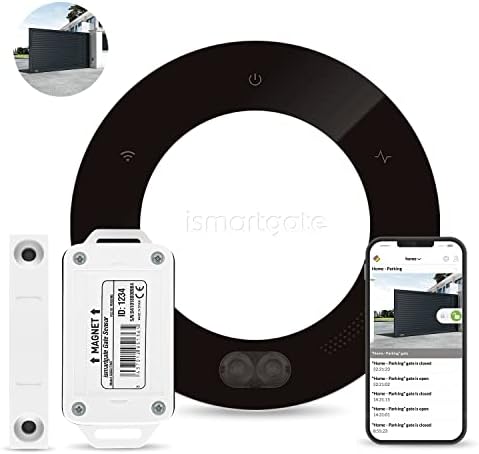
- Compatible with all garage door or gate openers (You can control up to 3 doors/gates ). Choose it for a ROLLER garage do…
- VOICE CONTROL AND FREE HOME INTEGRATION: ismartgate works with major smart home platforms for free: Apple Homekit, Googl…
- THE MOST COMPLETE SMART OPENER: ismartgate allows you to create different user accounts (restrictions by time, gate and …
For DIY enthusiasts, privacy-conscious users, and smart home power users wanting maximum flexibility and local control, ismartgate PRO delivers professional-grade features.
What We Loved:
Complete Local Control: Operates entirely on local network without cloud dependency. Internet outage? ismartgate continues functioning via local app access. Privacy-conscious users appreciate data staying home versus uploading to manufacturer servers. Best privacy among controllers tested.
Apple HomeKit Certified: Native HomeKit support with HomeKit Secure Video compatibility (when camera added). Siri voice control, Apple Home app integration, end-to-end encryption. For iPhone users, premium Apple experience.
Universal Compatibility (Including IFTTT): Works with Alexa, Google, HomeKit, IFTTT, SmartThings, Home Assistant. Most comprehensive smart home integration we tested. Create complex automations impossible with basic controllers.
Camera Support (Optional): Supports adding USB camera for garage monitoring. Camera functionality optional—buy basic controller ($80) or add camera later ($30-40). Flexibility vs Nexx’s integrated camera approach.
Web Interface (Advanced Control): Access via web browser for configuration, firmware updates, advanced settings. Power users appreciate detailed control beyond mobile apps. Professional-grade feature.
Multiple Garage Doors (Expandable): PRO model supports 3 doors standard, expandable to 6 with accessories. Scalable solution for complex garage configurations. Best multi-door expandability.
Advanced IFTTT Integration: Create sophisticated automations. “If garage opens after 10 PM, turn on all outdoor lights and send notification.” “If garage closes, verify security system is armed.” Unlimited automation possibilities.
Developer-Friendly: Open API, detailed documentation, active development community. Tech enthusiasts can integrate with custom smart home setups. Professional-grade flexibility.
The Downsides:
Most Expensive: At $120-140 for PRO model, ismartgate is premium-priced. You’re paying for flexibility, local control, and advanced features. For people wanting simple remote control, this is expensive and overcomplicated.
Complex Installation and Setup: Requires technical knowledge for advanced features. Basic installation is manageable (30-40 minutes) but unlocking full potential requires networking knowledge, IFTTT understanding, or Home Assistant familiarity. Not beginner-friendly.
Learning Curve is Steep: Web interface, advanced settings, IFTTT integration—all have learning curves. Expect 2-3 hours learning system before comfortable use. Casual users may never utilize advanced features, making premium price waste.
ismartgate App is Functional But Dated: Mobile app works but interface feels 5 years old. Not beautiful or intuitive like modern apps. Functionality exists but user experience is merely adequate.
Overkill for Most Users: The average homeowner wanting “open garage remotely” doesn’t need IFTTT, Home Assistant integration, web interfaces, or API access. ismartgate targets smart home enthusiasts, not mainstream users.
Camera Not Included: Unlike Nexx ($120 with camera), ismartgate charges $80-140 for controller, then $30-40 for camera separately. Total cost $110-180 for equivalent features. Cost adds up with accessories.
Limited Customer Support: Email-based support primarily. European company with US presence but phone support is limited. Response times were 24-48 hours. For people wanting immediate help, frustrating.
Who It’s For:
DIY enthusiasts and tinkerers, privacy-conscious users wanting local control, Apple HomeKit power users, smart home hobbyists using IFTTT or Home Assistant, tech-savvy homeowners, rental property owners wanting professional features, anyone prioritizing flexibility and customization over simplicity.
Our Experience After 12 Weeks:
Installation took 35 minutes—physical setup straightforward, configuration via web interface required technical comfort. We enabled local control (works during internet outages), integrated with Home Assistant for custom automations, connected to IFTTT for advanced triggers. HomeKit integration was excellent—Siri control, automations, secure encryption. We created automation: “when garage opens after 11 PM, flash outdoor lights red and send emergency notification”—works perfectly. Local control functioned flawlessly during internet outage. Advanced features required learning but unlocked capabilities impossible with basic controllers. After 12 weeks, ismartgate delivered professional-grade garage control for enthusiasts. For mainstream users wanting simple app control, this is overcomplicated and overpriced. For power users wanting maximum flexibility, this is best option.
Rating: 9/10 (enthusiasts), 5/10 (casual users)
Our Verdict: Which Smart Garage Controller Should You Buy?
After 12 weeks testing across different garage configurations, here’s our guidance:
Best for Chamberlain/LiftMaster: Chamberlain MyQ Smart Garage Hub
Official integration, reliable, affordable ($30-40). Perfect for single Chamberlain door.
Best Universal Controller: Meross Smart WiFi Garage Door Opener
Works with all brands, HomeKit support, controls 2 doors, no subscriptions. Best value ($40-45).
Best for Multiple Doors: Tailwind iQ3
Controls 3 doors, advanced geofencing, unlimited users, professional features ($70-80).
Best for Genie Openers: Genie Aladdin Connect
Official Genie solution, plug-and-play, battery backup support ($35-45).
Best Premium (With Camera): Nexx Garage NXG-200
Built-in camera, motion detection, free cloud storage. Security-focused ($120-130).
Best for DIY Enthusiasts: ismartgate PRO
Local control, HomeKit, IFTTT, unlimited customization. Power users ($120-140).
Decision Framework: Choose Based on Priorities
Priority: Chamberlain/LiftMaster Opener
→ Chamberlain MyQ ($30-40)
Priority: Universal + HomeKit
→ Meross ($40-45)
Priority: 2-3 Garage Doors
→ Tailwind iQ3 ($70-80) or Meross ($40-45)
Priority: Genie Opener
→ Genie Aladdin Connect ($35-45)
Priority: Garage Security Camera
→ Nexx Garage ($120-130)
Priority: Local Control + Privacy
→ ismartgate PRO ($120-140)
Priority: Budget (Single Door)
→ MyQ or Genie Aladdin (brand-specific, $30-45)
Priority: No Subscriptions
→ Meross, Tailwind, or ismartgate (all free)
Essential Smart Garage Door Tips
1. Verify Compatibility Before Buying
Use manufacturer’s compatibility checker. Verify your opener model and year. 5 minutes verification prevents frustrating returns.
2. Test WiFi Signal in Garage
Weak WiFi causes unreliable control. Test signal strength at garage location before installing controller. Install WiFi extender if needed.
3. Disable Old Remotes (Security)
Once smart controller installed, deprogram old remotes from opener. Prevents lost/stolen remotes being security vulnerability.
4. Set Up Auto-Close Schedule
Configure automatic closing if door left open (10 PM is common). Catches forgetfulness preventing overnight exposure.
5. Enable Notifications Immediately
Turn on door open/close alerts. First week helps verify controller works correctly, ongoing provides security monitoring.
6. Create Guest Access Carefully
Grant temporary access only for necessary duration. Review and revoke access after contractors/cleaners finish. Don’t leave expired access active.
7. Test During Power Outage
Verify what happens when power fails. Understand whether controller functions, how to manually operate door, what features remain available.
Common Smart Garage Door Mistakes
Mistake 1: Buying Without Compatibility Verification
Assuming universal compatibility wastes time and money. Always verify YOUR specific opener model works before purchasing.
Mistake 2: Installing with Weak WiFi
Garage far from router = unreliable control. Spend $25 on WiFi extender solving problem permanently.
Mistake 3: Not Disabling Physical Remotes
Keeping old remotes active creates security vulnerabilities. Deprogram after smart controller installed.
Mistake 4: Sharing Permanent Access Carelessly
Giving contractors permanent access instead of temporary codes creates long-term security risks. Use temporary access features.
Mistake 5: Ignoring Activity Logs
Not reviewing who accessed garage when. Logs identify problems (unexpected access, kids arriving late) before they escalate.
Mistake 6: Forgetting Manual Operation
Smart controller fails during power outage. Know how to manually operate garage door before emergency occurs.
Mistake 7: Not Testing Geofencing Accuracy
Assuming geofencing works perfectly without testing. Spend week verifying accuracy before trusting completely.
Final Thoughts: Our Personal Setup
After testing, here’s what we actually use:
Home Garage (2 doors, Chamberlain opener):
- Meross Smart WiFi Garage Door Opener ($45)
- Controls both doors with single controller
- HomeKit integration for Siri control
- Geofencing opens garage automatically
Rental Property (1 door, LiftMaster opener):
- Chamberlain MyQ ($35)
- Simple remote monitoring
- Grant temporary access to tenants
- Activity logs track usage
Workshop (1 door, Genie opener):
- Genie Aladdin Connect ($40)
- Basic control for occasional access
- Battery backup for power outages
Total Investment: $120 for 4 doors across 3 locations
Monthly Costs: $0 (no subscriptions)
Time Saved: 5+ hours annually (no hunting for remotes, no returning home to close forgotten door)
Biggest Surprise: How much peace of mind matters. Never wondering “did I close the garage?” eliminates daily anxiety. Checking status from anywhere is genuinely valuable.
If We Could Only Buy One: Meross for universal compatibility and HomeKit support ($40-45). Best features for best price unless you need brand-specific optimization.
Got Questions? Drop Them Below
Choosing smart garage controllers involves balancing compatibility, features, budget, and smart home ecosystem. Drop a comment if you have questions about:
- Whether your specific garage door opener is compatible
- How to troubleshoot WiFi connectivity in garage
- Whether geofencing reliability justifies the convenience
- Security concerns about smart garage door access
- Installation complexity for non-technical users
- Multi-door setup recommendations and cost analysis
We’re here to help you choose the right smart garage controller for your home!
Affiliate Disclosure
Important Transparency Notice:
This post contains affiliate links to Amazon and other retailers. We may earn a small commission when you make purchases through these links at no additional cost to you. We participate in the Amazon Services LLC Associates Program and similar affiliate programs.
Our Testing Standards and Ethics:
We purchased every smart garage controller reviewed with our own money—over $500 in controllers and testing across three properties. We did NOT receive free products from manufacturers. We tested each controller for 12 weeks across different garage configurations, opener brands, and installation scenarios.
Our reviews reflect experiences from extended testing, including installation challenges, compatibility verification, geofencing accuracy, and daily usability. Affiliate links do NOT influence our assessments. We share honest feedback about expensive controllers (noting Nexx and ismartgate premium pricing) and budget options (praising MyQ and Aladdin Connect value) based purely on performance.
Why We Use Affiliate Links:
Creating comprehensive smart garage controller reviews requires significant time (120+ hours of testing and writing) and money ($500+ in products across multiple properties). Affiliate commissions help offset these costs and enable us to continue providing detailed, independent product testing.
Thank you for supporting Automate Home through these affiliate links. Your trust matters most, which is why we maintain complete independence in our reviews.