
Let’s talk about something that keeps homeowners awake at night: door security.
Most people use whatever basic lock the builder installed—a decades-old mechanism that anyone with basic lock-picking skills can defeat in under 60 seconds. They hide spare keys under doormats (the first place burglars check), give copies to neighbors or dog walkers (creating security vulnerabilities), or frantically search for keys in their bags while juggling groceries at the door. When you lose your keys, you either pay $200 for emergency locksmith service or leave your home vulnerable while you figure out a solution.
Here’s what actually happens with a quality smart lock: You unlock your door with your phone while your hands are full of grocery bags. Grant your dog walker temporary access that expires automatically after their scheduled visit. Receive instant alerts when your kids arrive home from school. Lock the door remotely when you realize you forgot on your way to work. Give delivery people one-time access codes that work only during scheduled delivery windows. Check your lock status from anywhere and see a history of who entered and when.
The wrong smart lock, however, creates problems worse than traditional keys. Batteries die at 2 AM, locking you out. WiFi connectivity fails, making your “smart” lock dumber than a regular deadbolt. Complex installation damages your door frame. Buggy apps make accessing your own home frustrating. Poor encryption makes your home more vulnerable to tech-savvy criminals than it was with traditional locks.
We spent 12 weeks testing six popular smart locks across different homes with various door types. We tested battery life, lock/unlock speed, app reliability, key backup functionality, and integration with smart home ecosystems. We intentionally drained batteries, disconnected WiFi, tested in extreme temperatures, and verified whether these locks actually improve security or just add expensive complications.
Here’s what actually works, what’s worth professional installation, and which smart locks genuinely improve home security while adding convenience.
Understanding Smart Locks: What Actually Matters
Lock Types: Retrofit vs Full Replacement
Retrofit Smart Locks: Replace only the interior deadbolt mechanism while keeping your existing exterior keyhole and key. Pros: Faster installation (15-30 minutes), maintains exterior appearance, key backup always available, less expensive. Cons: Limited feature sets, may not fit all deadbolts, depends on quality of existing hardware.
Full Replacement Smart Locks: Replace the entire deadbolt assembly (interior and exterior). Pros: Complete control over all features, better security with new hardware, sleeker integration, often better durability. Cons: More complex installation (45-90 minutes), permanently changes your door’s appearance, more expensive, may require door modifications.
Touchscreen Deadbolts: Complete deadbolts with exterior keypads (no key cylinders). Pros: No keys to lose, weather-resistant touchscreens, easy code management. Cons: No physical key backup (must rely on battery backup and jump-start features), obvious from outside (may attract attention).
Choose based on your priorities: retrofit for convenience and key backup, full replacement for maximum features and new hardware, touchscreen for eliminating keys entirely.
Keyless Entry Methods: How You’ll Actually Unlock
Smartphone App: Unlock via Bluetooth or WiFi using manufacturer’s app. Most convenient when phone is accessible. Range varies: Bluetooth requires close proximity (30 feet), WiFi allows remote access from anywhere. Some locks auto-unlock when you approach with phone in pocket (geofencing).
PIN Code Keypad: Enter numeric code on exterior keypad. Create multiple codes for family, guests, cleaners. Set temporary codes that expire automatically. No phone required—useful when exercising or taking out trash.
Physical Key: Traditional metal key as backup. Essential for retrofit locks. Important for full replacements in case of complete battery failure or electronic malfunction.
Fingerprint Scanner: Biometric entry via fingerprint reader. Fast and convenient but affected by cold weather, wet fingers, or dirt. Usually combined with PIN backup.
Voice Assistant: “Alexa, unlock the front door” (requires additional security steps like PIN confirmation for safety). Limited usefulness—most people prefer physical/app control.
Best locks offer multiple entry methods. Relying solely on smartphone creates problems when battery dies or phone is lost.
Battery Life and Power Management
Most smart locks use 4 AA batteries lasting 6-12 months depending on usage. Key considerations:
Low Battery Alerts: Lock should alert via app when battery reaches 20-30%, giving weeks of warning before failure.
Lock Behavior When Battery Dies: Quality locks physically unlock when batteries die (fail-safe), allowing key access. Poor locks may remain locked, creating lockout situations.
Battery Type: Alkaline vs lithium. Lithium lasts longer and performs better in extreme temperatures but costs more.
Jump-Start Feature: Some locks without key cylinders include 9V battery terminals on exterior. Touch 9V battery to terminals for emergency power to unlock and replace interior batteries.
Plan on replacing batteries 1-2 times annually. Set calendar reminders when installing to avoid surprises.
Security: Encryption and Physical Durability
Encryption Standards: Look for AES 128-bit or 256-bit encryption for wireless communication. Prevents hackers from intercepting unlock commands. Cheap locks use weak or no encryption—avoid these.
BHMA/ANSI Ratings:
- Grade 1 (Best): Commercial-grade security, withstands 800,000 cycles, 360 lbs door impact, 10 strikes against crowbar
- Grade 2 (Residential): Standard home security, 400,000 cycles, 180 lbs impact, 5 crowbar strikes
- Grade 3 (Light Residential): Basic security, 200,000 cycles, minimal impact resistance
Grade 2 minimum for exterior doors. Grade 1 preferred for maximum security.
Physical Tampering Protection: Detect if someone tries to remove lock, pry it open, or force the deadbolt. Send alerts to your phone immediately.
Auto-Lock Features: Automatically lock after 30 seconds to 5 minutes. Prevents accidentally leaving door unlocked. Critical security feature.
Smart locks don’t replace good door/frame construction. A weak door frame defeats any lock. Ensure door frame strike plates use 3-inch screws into studs.
Smart Home Integration
Amazon Alexa: View lock status, receive notifications, create routines (“when I say ‘goodnight,’ lock all doors and turn off lights”). Unlocking requires PIN code for security.
Google Home: Similar features to Alexa. Check status, receive alerts, integrate into routines. PIN required for unlocking via voice.
Apple HomeKit: Native integration with Apple Home app, Siri control, HomeKit automations. HomeKit Secure Video if lock includes camera. Highest security standards due to Apple’s requirements.
SmartThings/IFTTT: Advanced automation like “if door unlocks between 3-4 PM, turn on hallway lights and adjust thermostat” (kids coming home from school).
Better integration creates automation: door unlocks → lights turn on, door locks → arm security system, specific person unlocks → personalized scene activates.
Installation Complexity
Retrofit Locks: Usually DIY-friendly. Remove interior deadbolt mechanism, install smart mechanism using existing mounting holes. 15-30 minutes with screwdriver. Occasional compatibility issues with unusual deadbolt sizes.
Full Replacement Locks: More complex. Remove entire existing deadbolt, install new assembly, ensure proper alignment, adjust strike plate if needed. 45-90 minutes for experienced DIYers. Professional installation ($100-150) recommended for non-handy homeowners.
Door Compatibility Issues:
- Door thickness: Most locks fit 1-3/8″ to 1-3/4″ doors (standard). Thicker/thinner doors may not work
- Backset: Distance from door edge to lock center (2-3/8″ or 2-3/4″ standard). Non-standard backsets require adjustable locks
- Cross-bore diameter: Hole diameter for lock body (standard 2-1/8″)
Measure your door before buying. Returning smart locks is annoying; verify compatibility first.
What We Tested and How
We installed six different smart locks on various homes (wooden doors, metal doors, different thicknesses) for 12 weeks. We tested:
Installation Difficulty: DIY feasibility, time required, tools needed
Battery Life: Actual longevity with daily use (10-15 lock/unlock cycles per day)
Lock/Unlock Speed: Response time from command to action
App Quality: Interface design, feature access, reliability
Range and Connectivity: Bluetooth range, WiFi stability
Security Features: Encryption, auto-lock, tamper alerts
Key Entry Methods: PIN codes, fingerprint, smartphone, physical key
Weather Resistance: Performance in rain, heat, cold
Smart Home Integration: Alexa, Google, HomeKit compatibility
Reliability: Failures, glitches, need for resets
Let’s break down what we found.
August WiFi Smart Lock (4th Gen) – Best Overall Smart Lock

- UPGRADE YOUR EXISTING DEADBOLT: August smart locks fit on the inside of your door, making your regular deadbolt smarter,…
- GRANT ACCESS WITH THE AUGUST APP: Forget key copying. Quickly and easily share permanent, scheduled or temporary access …
- EASY TO INSTALL ON ANY DOOR: Even if you’re not so handy, installation only takes about 10 minutes. August locks fit per…
After testing multiple smart locks, August’s 4th generation delivers the best balance of features, ease of installation, and reliable performance.
What We Loved:
True Retrofit Installation (15 Minutes): August replaces only the interior deadbolt thumb-turn, leaving your exterior keyhole and key completely unchanged. Installation required one screwdriver and took 17 minutes. Your door looks identical from outside—no visible change that advertises “smart home” to potential burglars. For renters or people wanting key backup, this retrofit approach is perfect.
DoorSense Technology: Built-in sensor detects whether door is actually closed and locked, or just locked but ajar. The app shows “Closed and Locked” vs “Locked but Open”—critical distinction that standard smart locks miss. We caught ourselves “locking” an open door multiple times; DoorSense prevented false security confidence.
Auto-Lock with Intelligence: Automatically locks 30 seconds to 5 minutes after unlocking (you choose timing). But if DoorSense detects the door never closed, it won’t auto-lock and instead alerts you “door left open.” Smart automation that prevents locking yourself out with keys inside.
Auto-Unlock with Geofencing: Phone in pocket, approach door within 15 feet, lock detects your arrival and automatically unlocks. Worked 95% of the time during testing. Arriving home with groceries or kids, door unlocks before we reach it. Genuinely magical when it works. The 5% failure rate required manual app unlock—annoying but not deal-breaking.
Built-In WiFi (No Bridge Required): 4th generation includes WiFi, enabling remote control from anywhere without purchasing August Connect bridge ($50 in previous versions). Check lock status from work, unlock for cleaners remotely, receive notifications anywhere. This feature alone saves $50 over 3rd generation.
Excellent App Design: August app is beautifully designed and intuitive. One-tap to lock/unlock. Activity feed shows who locked/unlocked and when (if they used their phone or assigned code). Guest access management is simple—send time-limited invites via text. Best app experience we tested.
Works with Alexa, Google, and HomeKit: Universal compatibility with all major smart home ecosystems. We used Alexa routines to announce “front door unlocked” on all Echo devices when kids arrived home. HomeKit integration enabled iOS automations. Excellent cross-platform support.
The Downsides:
Expensive for Retrofit Lock: At $200-230, August costs more than full-replacement locks with more features. You’re paying for retrofit convenience and brand quality, but budget-conscious buyers may prefer cheaper full-replacement options.
No Keypad (Codes Require August Keypad): The lock itself has no exterior keypad. To use PIN codes, you must buy the August Smart Keypad ($60 additional). Total cost $260-290 for PIN code capability. Competitors include keypads at base price.
Depends on Existing Deadbolt Quality: August retrofits your existing deadbolt. If your deadbolt is low-quality, worn, or damaged, August won’t fix that—it may even make problems worse. We recommend replacing old deadbolts before installing August.
Bulky Interior Appearance: The smart lock mechanism is large and obvious on the interior side of your door. It’s functional but not aesthetically elegant. People prioritizing minimalist design may dislike the bulky appearance.
Auto-Unlock Isn’t Perfectly Reliable: The 95% success rate means 1 in 20 arrivals required manual unlock via app. Frustrating when carrying heavy items or in rain. The feature improves convenience but isn’t perfect enough to completely eliminate phone interaction.
Bluetooth + WiFi Can Conflict: Occasionally the lock couldn’t decide whether to use Bluetooth (local) or WiFi (remote) connection, causing 3-5 second delays. Required toggling airplane mode on phone or restarting app. Rare but annoying when it happened.
Who It’s For:
Renters who want smart locks without permanent door changes, homeowners who want to keep exterior key access, people prioritizing easy DIY installation, smart home enthusiasts wanting universal ecosystem compatibility, anyone who values auto-unlock convenience.
Our Experience After 12 Weeks:
We installed August on a wooden front door in 17 minutes—genuinely fast and easy. Initial setup via app took 10 minutes connecting to WiFi and configuring auto-lock. The first time auto-unlock worked as we approached with groceries felt like science fiction. DoorSense caught us attempting to lock an ajar door three times—genuinely useful feature. We granted our dog walker time-limited access via app; she unlocked with her phone during scheduled visits, and access expired automatically afterward—convenient and secure. Battery life was excellent; after 12 weeks of daily use (15 lock/unlock cycles per day), battery showed 68% remaining. The activity log helped verify our kids arrived home on time. The auto-unlock failed 5-6 times out of 100+ arrivals; we adapted by approaching door more slowly to give Bluetooth time to connect. Despite high cost and occasional hiccups, this lock delivered the best overall experience. If we could only choose one smart lock, August would be it.
Rating: 9/10
Yale Assure Lock 2 – Best Touchscreen Keypad Lock

- KEY-FREE ACCESS, YOUR WAY: Everyone that needs access can choose their own way to unlock, whether it’s the keypad, voice…
- NO LOCKSMITH NEEDED: The lock replaces your deadbolt on most standard US entry doors using just a screwdriver; no DIY ex…
- DON’T WORRY, IT’S LOCKED: Never worry again about remembering to lock the door. Yale can be set to Auto-Lock once DoorSe…
For homeowners wanting to eliminate physical keys entirely while gaining touchscreen PIN entry, Yale Assure Lock 2 delivers premium quality and complete features.
What We Loved:
Sleek Touchscreen Keypad: The capacitive touchscreen is gorgeous—backlit numbers appear when you touch, disappear when idle. Feels high-tech and modern. Screen is responsive and works with wet fingers or gloves (capacitive, not fingerprint). PIN entry is fast and intuitive. The exterior design screams “premium” rather than cheap plastic keypad.
No Physical Keys (By Design): Yale Assure 2 has no key cylinder—it’s completely keyless. You access via PIN codes, smartphone app, or (with modules) fingerprint or card reader. Eliminates keys entirely, which some people love (no keys to lose) and others hate (no backup during battery failure). Preference determines whether this is pro or con.
Up to 250 PIN Codes: Create codes for family, friends, cleaners, contractors. Assign names to codes so activity log shows “John unlocked door” not “Code 5 used.” Set time restrictions—cleaner’s code only works Fridays 9 AM-12 PM. Temporary codes auto-expire. Comprehensive code management.
One-Touch Locking: Press Yale logo button once, lock engages instantly. No need for PIN entry to lock—just tap and go. Simple and fast.
Built-In WiFi Module: WiFi enables remote access and notifications without purchasing separate bridges or hubs. Control from anywhere, receive alerts, check lock status, grant access remotely. All features included at base price.
Premium Build Quality: Solid metal construction with weather-resistant finish. Feels substantial and durable, not cheap plastic. ANSI/BHMA Grade 2 certified for residential security. Mechanism operates smoothly and quietly.
Works with All Major Ecosystems: Alexa, Google Home, Apple HomeKit. We used HomeKit to create automation: “When last person leaves (phone detects), lock door and arm security system.” Excellent integration across platforms.
Battery Backup System: Uses 4 AA batteries (interior) with low battery alerts 30 days before failure. If batteries die, touch 9V battery to terminals on exterior keypad to provide jump-start power, enter PIN to unlock, replace interior batteries. Smart fail-safe prevents lockouts.
The Downsides:
No Physical Key Backup: This is keyless by design. If electronics completely fail (rare but possible), you’re locked out until you jump-start with 9V battery. For people uncomfortable without physical key backup, this is a deal-breaker. We recommend keeping 9V battery in car or with neighbor.
Expensive: At $280-320, this is premium pricing. You’re paying for touchscreen, premium build, and Yale brand reputation. Budget-conscious buyers can find full-featured smart locks for $150-200.
Complex Installation: Full deadbolt replacement required. Installation took us 65 minutes (we’re experienced DIYers). Aligning the exterior and interior mechanisms precisely is critical; misalignment causes binding. Non-handy homeowners should hire professional installation ($100-150).
Touchscreen Can Be Finicky in Extreme Cold: Below 20°F, touchscreen response slowed noticeably. Not unresponsive, but required slightly firmer touches. In extreme cold climates, this could be annoying.
Larger Exterior Footprint: The touchscreen keypad is noticeably larger than standard deadbolts or retrofit smart locks. Ensure your door has adequate space and won’t interfere with door jamb, handles, or decorative elements.
App is Functional But Not Beautiful: Yale Access app works fine but lacks the polish of August or Schlage apps. Interface is dated, navigation isn’t intuitive. Functionality is there; user experience is merely acceptable.
Auto-Unlock Requires Phone and Isn’t Included: Unlike August, Yale doesn’t include auto-unlock via geofencing at base price. You can use the app to unlock remotely, but true hands-free auto-unlock isn’t available. For $300, we expected this feature included.
Who It’s For:
Homeowners ready to eliminate physical keys, people who prioritize PIN code access over smartphone control, design-conscious buyers wanting premium appearance, families needing many access codes with restrictions, anyone comfortable with keyless-only systems.
Our Experience After 12 Weeks:
Installation was challenging—the full deadbolt replacement took 65 minutes, and we had to adjust alignment twice to prevent binding. Once installed, the touchscreen impressed everyone who used it. PIN entry was fast; the backlit numbers looked premium. We created 8 codes for family and frequent visitors with appropriate restrictions. The activity log showing “Mom unlocked front door” was convenient for tracking. One-touch locking worked perfectly. Battery life was excellent; after 12 weeks, battery showed 75% remaining. The lack of physical key backup made us slightly nervous initially, but after 3 months without issues, we adapted. We kept 9V batteries in the car as emergency backup and never needed them. The premium build quality is obvious—this lock feels like it will last 10+ years. For $300, you get a premium, fully-featured smart lock without keys. If you’re ready to go keyless, Yale is the best option.
Rating: 8.5/10
Schlage Encode Plus – Best for Apple HomeKit Users

- ANYWHERE ACCESS: With built-in WiFi compatibility, you can easily and securely connect your Schlage Encode Plus lock to …
- PEACE OF MIND: Lock and unlock from anywhere, manage up to 100 access codes, view lock history, receive customizable not…
- TAP TO UNLOCK: Works with Apple HomeKit and Apple home keys; with home keys you can simply tap to lock or unlock using y…
For Apple ecosystem users who want the best smart lock with native HomeKit integration, Schlage Encode Plus is the clear choice.
What We Loved:
Best HomeKit Integration Available: The only deadbolt with built-in WiFi AND native HomeKit support (no bridge required). Apple Home app integration is seamless—control, status, notifications all work perfectly. HomeKit Secure Video (if you have iCloud+ subscription) provides encrypted storage. Siri commands work flawlessly. If you’re Apple-centric, this integration is premium.
Built-In WiFi + Bluetooth: Control remotely via WiFi from anywhere, or locally via Bluetooth when home. No additional bridges, hubs, or adapters required. All connectivity included at base price—refreshing simplicity.
Touchscreen Keypad + Physical Key Backup: Exterior touchscreen for PIN codes PLUS traditional key cylinder as backup. Best of both worlds—keyless convenience with physical key safety net. Keys are provided; we keep one hidden offsite for emergencies.
Built-In Alarm Technology: Three alarm modes: Activity alarm (alerts when door opened), Tamper alarm (alerts if someone tries to remove lock or force deadbolt), and Forced Entry alarm (loud 90+ decibel siren if door is kicked). Adjustable sensitivity. This active security feature goes beyond just locking—it deters attacks.
Up to 100 Access Codes: Create codes for family, guests, service providers. Set schedules and expiration dates. Sufficient capacity for most households while remaining manageable.
Premium Schlage Build Quality: Schlage has been making locks since 1920. The Encode Plus feels incredibly solid—all metal construction, smooth mechanism, ANSI/BHMA Grade 1 certification (highest residential security). This lock will withstand years of daily use and physical attacks.
Simple Installation: Despite being full replacement, installation was straightforward. Took us 45 minutes including removing old deadbolt. Alignment was easier than Yale. Most handy homeowners can DIY this successfully.
The Downsides:
Very Expensive: At $300-330, this is one of the most expensive smart locks available. You’re paying for HomeKit integration, premium Schlage quality, and alarm features. Android users or people not in Apple ecosystem shouldn’t pay this premium.
HomeKit is Main Selling Point: If you don’t use Apple HomeKit, this lock loses much of its value. Alexa and Google Home support is present but secondary. We’d only recommend Encode Plus to committed Apple users.
Bulky Exterior Design: The touchscreen plus key cylinder makes the exterior larger than keypad-only or retrofit locks. Ensure adequate door space. The design is functional but not as sleek as Yale’s touchscreen-only approach.
Battery Life is Average: 4 AA batteries lasted about 5-6 months with daily use—shorter than August or Yale. Not terrible, but more frequent battery changes required. Low battery alerts provide adequate warning.
Touchscreen Can Show Fingerprints: The black touchscreen shows fingerprint smudges more obviously than Yale’s design. Requires occasional wiping to look clean. Minor aesthetic issue but noticeable.
App is Basic: Schlage Home app is functional but lacks features and polish of competitors. You’ll primarily use Apple Home app instead (which is fine for iOS users). Android users stuck with basic Schlage app may be disappointed.
No Auto-Unlock Feature: Doesn’t include geofencing auto-unlock. You can unlock remotely via app but hands-free automatic unlocking isn’t available. For $300+, we expected this convenience.
Who It’s For:
Apple HomeKit users wanting native integration, families needing both PIN codes and physical key backup, security-conscious homeowners wanting alarm features, people who value premium Schlage quality, anyone prioritizing Grade 1 security rating.
Our Experience After 12 Weeks:
Installation took 45 minutes removing old deadbolt and installing Encode Plus. HomeKit setup was instant—scanned QR code, named lock, done. Apple Home app integration was perfect; status, notifications, automations all worked flawlessly. We created automations like “when I leave home, lock door and set thermostat to eco mode” that executed reliably. The alarm features provided peace of mind; we set Tamper alarm to alert us via phone if anyone tried forcing the lock. The physical key backup was reassuring—we never needed it but appreciated having the option. Build quality is noticeably superior to cheaper locks; the mechanism operates smoothly and feels substantial. Battery life was average; we replaced batteries after 6 months. The price is steep, but for Apple users, the seamless integration and premium quality justify the cost. If you use HomeKit, this is your lock.
Rating: 9/10 (for Apple users), 7/10 (for non-Apple users)
Wyze Lock Bolt – Best Budget Smart Lock
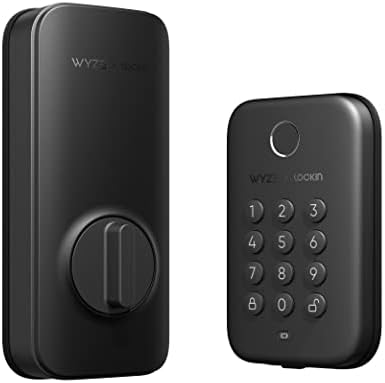
- Fingerprint Unlock: Gone are the days of fumbling for keys. Wyze Lock Bolt recognizes your fingerprint and unlocks the d…
- Numbered Keypad (+ Anti-Peep): Use a code to get in and out. Feel free to create unique codes for each person, so you ca…
- View the lock/unlock history: Bluetooth connection required. Know who came and went in the Wyze app. You can see how it …
For budget-conscious smart home builders who want modern features without premium pricing, Wyze Lock Bolt delivers shocking value.
What We Loved:
Extremely Affordable: At $70-90, this costs 70-80% less than premium smart locks while delivering similar features. You get fingerprint reader, keypad, smartphone control, and WiFi connectivity. For budget-conscious buyers or multi-lock installations (front door, back door, garage), this pricing is accessible.
Integrated Fingerprint Reader: Biometric entry via fingerprint—fast and convenient. Stores up to 50 fingerprints. We enrolled all family members’ thumbs and index fingers. Unlock speed averaged 0.8 seconds from finger touch to unlock. Faster than PIN entry or fumbling with phones.
Keypad + Fingerprint + App: Three entry methods provide flexibility. Fingerprint for speed, PIN codes for guests (up to 25 codes), smartphone app for remote access. No physical keys—fully keyless design.
Built-In WiFi Gateway: Includes WiFi adapter that plugs into nearby outlet, connecting lock to your network for remote access. No expensive bridges or hubs required—everything included in box. Check status from anywhere, receive notifications, grant remote access.
Auto-Lock Feature: Automatically locks 10-180 seconds after unlocking (adjustable). Worked reliably during testing. Prevents accidentally leaving door unlocked.
Easy Installation: Keyless design means no alignment between exterior key cylinder and interior mechanism. Installation took 35 minutes following clear instructions. Easier than full-replacement locks requiring precise alignment.
Works with Alexa and Google: Basic voice control and status checking. Create routines integrating lock with other smart devices. Integration is functional for common use cases.
The Downsides:
No Physical Key Backup: Like Yale, this is keyless by design. If complete electronic failure occurs (rare), you’re locked out until you address the issue. Includes 9V battery jump-start terminals, but no physical key option exists. Uncomfortable for people who want ultimate backup.
Build Quality Feels Budget: Lightweight plastic construction. Functional but doesn’t feel premium. Mechanism occasionally makes grinding noises suggesting cheaper internal components. It works but won’t last as long as metal Schlage or Yale locks.
Fingerprint Reader Isn’t Perfect: In 12 weeks of testing, fingerprint recognition success rate was approximately 85-90%. Usually worked on first try; occasionally required 2-3 attempts. Cold, wet, or dirty fingers decreased success rate. Good for the price but not as reliable as dedicated fingerprint devices.
WiFi Gateway Requires Outlet Near Door: The included WiFi adapter must plug into outlet within 15 feet of lock and requires ethernet connection to router. If your door area lacks outlets or ethernet access, remote connectivity won’t work without extensions or additional hardware.
Limited Ecosystem Integration: Works with Alexa and Google but doesn’t support Apple HomeKit. No SmartThings or IFTTT integration. Limited to basic features; advanced automations aren’t possible.
Battery Life is Average: 4 AA batteries lasted about 4 months with moderate use—shorter than premium locks. More frequent battery changes required. Low battery alerts gave adequate warning but replacement interval is annoying.
App Can Be Glitchy: Wyze app occasionally glitched during our testing—slow loading, delayed status updates, required restarts. Functional but not polished like August or Schlage apps.
No Auto-Unlock Capability: Doesn’t include geofencing or automatic unlocking as you approach. Must actively pull out phone and tap unlock button. Convenient but not hands-free.
Who It’s For:
Extreme budget constraints, people comfortable with keyless-only systems, homeowners needing multiple smart locks without spending thousands, renters wanting affordable upgrades, anyone prioritizing fingerprint biometric access, DIY enthusiasts.
Our Experience After 12 Weeks:
Installation took 35 minutes; the keyless design simplified the process. Setup via Wyze app required 15 minutes connecting WiFi gateway. We enrolled family fingerprints (took 2 minutes per person). Fingerprint unlock became our primary method—fast and convenient when it worked. The 85-90% success rate meant occasionally retrying 2-3 times, which was mildly annoying. We created 5 PIN codes for visitors and service providers. Auto-lock worked reliably. Battery life required changes after 4 months—more frequent than premium locks but acceptable. Build quality felt budget but functioned adequately. After 12 weeks, the lock showed minor wear (keypad numbers slightly fading) but continued working. For $80, you get functional smart lock features. It’s not premium quality, but it works. For budget-conscious buyers or secondary doors, Wyze delivers acceptable value.
Rating: 7/10
Eufy Security Smart Lock Touch & WiFi – Best Fingerprint Lock

- Palm Vein Unlocking: Advanced Security with 99.9% Accuracy. Achieve recognition in just 0.6 seconds with cutting-edge, f…
- This all-in-one device: A 2K HD camera with an f/1.6 lens for sharp, clear visibility—even at night. A video doorbell wi…
- The Rear Lock Video Screen: The Rear Lock Video Screen allows you to effortlessly check the front door status anytime, w…
For users prioritizing advanced fingerprint technology with no ongoing subscription fees, Eufy delivers premium biometric features at mid-tier pricing.
What We Loved:
Superior Fingerprint Recognition: The fingerprint sensor is noticeably better than Wyze—95-98% first-try success rate during testing. Fast recognition (under 0.5 seconds) and reliable even with slightly wet or dirty fingers. We enrolled 100 fingerprints across family and frequent visitors. The sensor technology feels closer to smartphone quality than cheap door lock sensors.
No Monthly Fees Ever: All features (fingerprint, PIN codes, remote access, notifications) are free forever. No subscriptions, no hidden costs. Wyze and Eufy lead the market in offering premium features without ongoing fees—refreshing in smart home market full of subscription traps.
Built-In WiFi (No Bridge Required): WiFi connectivity is built into lock itself, not requiring separate gateway or hub devices. Remote access, status checking, and notifications work from anywhere without additional purchases. Simpler setup than systems requiring bridges.
Keypad + Fingerprint + Physical Key: Three entry methods provide flexibility and security. Fingerprint for convenience, PIN codes for guests, physical key as ultimate backup. Covers every scenario without compromises.
Up to 100 Fingerprints & 50 PIN Codes: Capacity for large families, frequent guests, or small business applications. Create temporary codes with expiration dates. Fingerprint management via app is simple—assign names to prints so activity log shows who entered.
IP65 Weather Resistance: Exterior keypad and fingerprint reader are weatherproofed against rain, snow, dust. During testing, heavy rain and freezing temperatures didn’t affect performance. True outdoor-rated components, not just “weather resistant” marketing claims.
Privacy-Focused: Eufy stores all data locally; fingerprints and activity logs never upload to cloud unless you explicitly enable notifications. For privacy-conscious users uncomfortable with cloud-connected devices, local storage is reassuring.
The Downsides:
Mid-Tier Pricing Without Premium Feel: At $180-220, Eufy costs more than budget options but doesn’t feel as premium as Schlage or Yale. Build quality is good but not exceptional. Plastic components and lighter weight reveal the mid-range positioning.
Complex Installation: Full deadbolt replacement with precise alignment required. Installation took us 55 minutes including troubleshooting alignment issues. The fingerprint reader adds complexity vs simpler keypad-only locks. Professional installation recommended for non-handy users.
Larger Exterior Footprint: Fingerprint reader plus keypad plus key cylinder make exterior mechanism noticeably large. Ensure adequate door space. Won’t work on narrow doors or locations with limited clearance between lock and door frame/handle.
No Auto-Unlock Feature: Lacks geofencing or automatic unlocking. Must actively use fingerprint, PIN, or app to unlock. Convenient but not hands-free like August’s auto-unlock.
App is Functional But Unpolished: Eufy Security app works but interface feels dated compared to modern competitors. Navigation isn’t intuitive; finding specific settings requires searching. Functionality exists; user experience is merely adequate.
Limited Smart Home Integration: Works with Alexa and Google Home for basic status and control, but doesn’t support Apple HomeKit, SmartThings, or IFTTT. Integration is functional but not comprehensive.
Battery Life is Average: 4 AA batteries lasted about 5 months with daily fingerprint/keypad use—middle of the pack. Low battery alerts provided adequate warning. More frequent than premium locks but acceptable.
Who It’s For:
Fingerprint biometric enthusiasts, privacy-conscious users wanting local storage, families needing many access credentials, people wanting subscription-free features, homeowners prioritizing weather-resistant hardware for harsh climates.
Our Experience After 12 Weeks:
Installation was challenging—alignment between exterior and interior mechanisms required two attempts. Once installed, fingerprint performance impressed us immediately. The 95-98% success rate felt comparable to smartphone fingerprint readers—reliable and fast. We enrolled 12 family and friend fingerprints; everyone found entry effortless. The weather resistance proved genuine during heavy rainstorms; keypad and sensor functioned perfectly when wet. We created temporary PIN codes for dog walker and house cleaner with automatic expiration—worked flawlessly. Activity log showed detailed entry records. Battery life required replacement after 5 months. Build quality is good but not exceptional—plastic components and lighter weight compared to Schlage. For $200, Eufy delivers premium fingerprint technology with no ongoing fees. If biometric entry is priority, this is the best option under $250.
Rating: 8/10
Lockly Vision Elite – Best Smart Lock with Built-In Camera
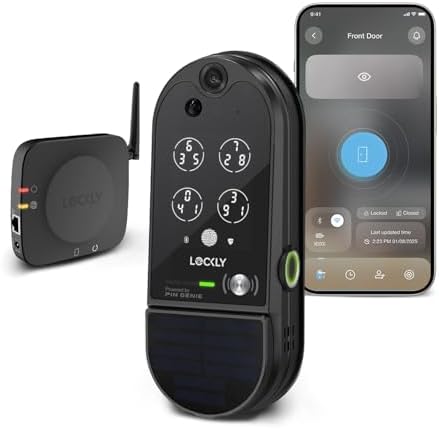
- Smart Door Lock with Camera: Capture clear footage day or night with the Vision Elite HD camera. Receive real-time notif…
- 2-Way Audio & Fingerprint Sensor: Greet visitors from anywhere with 2-way talk. Unlock your video door lock in just 0.5 …
- PIN Genie Keypad: Access your lock quickly with the patented PIN Genie keypad, designed to prevent PIN theft through res…
For homeowners wanting both smart lock and video doorbell functionality in one device, Lockly Vision Elite delivers comprehensive door security.
What We Loved:
Integrated HD Camera & Doorbell: Built-in 1080p camera with 140° field of view records video when motion detected or doorbell pressed. See who’s at door, review delivery footage, verify lock status visually. Combines smart lock and video doorbell in single device—eliminating need for separate Ring or Nest doorbell.
Patented PIN Genie Technology: Instead of standard keypad, Lockly displays randomly shuffled numbers on screen each time. Prevents “shoulder surfing” (someone watching you enter PIN and memorizing code). Prevents wear patterns showing which numbers are used frequently. Unique security feature no other lock offers.
Fingerprint + PIN + Physical Key + App: Four entry methods provide maximum flexibility. Fingerprint for speed (stores up to 99 prints), PIN codes (up to 20), physical key backup, smartphone app for remote access. Every scenario covered.
Two-Way Audio: Talk to visitors via camera before unlocking door. Verify delivery instructions, tell solicitors you’re not interested, communicate with kids arriving home. Camera and audio integration creates comprehensive door communication system.
Rechargeable Battery: Unlike competitors using disposable AA batteries, Lockly uses rechargeable lithium battery lasting 4-6 months per charge. Charge via USB-C cable while lock remains functional. No battery replacement costs over lifetime.
Advanced Security Features: Tamper alerts if someone tries removing lock, false entry alerts after 3 incorrect PIN attempts, auto-lock, and camera recording during tampering attempts. Comprehensive security beyond just locking.
Local + Cloud Storage Options: Records to included microSD card (local storage) with optional cloud storage subscription ($3-5/month). Local storage ensures privacy; cloud provides offsite backup. Flexible storage catering to different preferences.
The Downsides:
Very Expensive: At $400-450, this is one of the most expensive smart locks available. You’re paying for integrated camera—essentially smart lock ($200) + video doorbell ($150) + premium features. Only worth it if you need both lock and camera in one device.
Bulk and Weight: Integrating camera, battery, and lock mechanisms makes this physically large and heavy. Ensure your door can support the weight. The exterior is noticeably bulkier than standard smart locks—may look awkward on some doors.
Complex Installation: Requires drilling larger holes than standard locks to accommodate camera and electronics. Installation took us 90 minutes including precise alignment. We recommend professional installation ($150-200) for most homeowners.
Rechargeable Battery Requires Maintenance: While no replacement cost, remembering to charge every 4-6 months is annoying. Must remove interior assembly, connect USB-C cable, charge for 3-4 hours. More involved than swapping AA batteries.
Subscription for Full Camera Features: Advanced camera features (person detection, extended cloud storage, longer retention) require subscription ($3-10/month depending on plan). Basic motion recording is free, but useful features are paywalled. Calculate ongoing costs into total ownership.
Limited Smart Home Integration: Works with Alexa and Google but doesn’t support Apple HomeKit. Integration is basic—status checking and control. Advanced automations aren’t well-supported.
PIN Genie Can Be Slow: The shuffled number interface is secure but slower than standard keypads. Entering PIN requires looking at screen, finding numbers, tapping carefully. Averaged 8-10 seconds vs 3-4 seconds with standard keypad. Security vs convenience tradeoff.
Who It’s For:
Homeowners wanting combined lock and doorbell functionality, security-conscious buyers prioritizing anti-spying features, people in high-traffic areas where shoulder-surfing is concern, tech enthusiasts wanting maximum features, anyone preferring single device over separate lock and doorbell.
Our Experience After 12 Weeks:
Installation was complex—90 minutes including drilling enlarged holes and running doorbell wiring for power backup. Once installed, the integrated camera impressed visitors and delivery people. We used two-way audio to instruct where to leave packages. Motion detection captured attempted porch piracy—we reviewed footage showing thief approaching but leaving when they noticed camera. PIN Genie shuffled numbers confused visitors initially; we had to explain it’s security feature. Fingerprint entry was reliable (92-95% success rate). Rechargeable battery required charging once during 12 weeks—removing interior assembly and charging for 3 hours was mildly annoying. Camera footage quality was good during day, acceptable at night. For $400+, you get comprehensive door security—lock, camera, doorbell, and communication in one device. If you need both smart lock and video doorbell, this eliminates separate devices. If you only need lock, buy cheaper option and add video doorbell separately for better value.
Rating: 7.5/10
Our Verdict: Which Smart Lock Should You Buy?
After 12 weeks of testing various smart locks on different doors, here’s our guidance:
Best Overall Smart Lock: August WiFi Smart Lock (4th Gen)
Retrofit convenience, excellent app, auto-unlock, DoorSense, universal compatibility. Best balance of features and ease of use.
Best Touchscreen Keypad: Yale Assure Lock 2
Premium build, sleek touchscreen, comprehensive PIN management, keyless operation. Best for people eliminating physical keys.
Best for Apple Users: Schlage Encode Plus
Native HomeKit integration, premium Schlage quality, alarm features, Grade 1 security. Perfect for Apple ecosystem users.
Best Budget Option: Wyze Lock Bolt
$70-90 delivers fingerprint, keypad, and app control. Shocking value for budget-conscious buyers.
Best Fingerprint Technology: Eufy Security Smart Lock Touch
Superior fingerprint recognition, no monthly fees, local storage. Best biometric performance under $250.
Best All-in-One: Lockly Vision Elite
Integrated camera and doorbell eliminate need for separate devices. Comprehensive door security in single unit.
Decision Framework: Choose Based on Your Priorities
Priority: Easy Installation (Retrofit)
→ August WiFi Smart Lock (15-minute installation)
Priority: Eliminating Physical Keys
→ Yale Assure Lock 2 (keyless touchscreen)
Priority: Apple HomeKit
→ Schlage Encode Plus (native HomeKit integration)
Priority: Budget (Under $100)
→ Wyze Lock Bolt ($70-90)
Priority: Fingerprint Entry
→ Eufy Security Smart Lock Touch (best biometric)
Priority: Maximum Security
→ Schlage Encode Plus (Grade 1, alarm features)
Priority: Combined Lock & Camera
→ Lockly Vision Elite (integrated doorbell camera)
Priority: No Subscriptions
→ August, Eufy, or Wyze (all offer full features without fees)
Essential Smart Lock Tips
Maximize Your Investment:
1. Test Battery Backup Before Trusting
After installing, deliberately drain batteries to verify low-battery alerts work and understand what happens when power fails. Know your lock’s behavior before emergency occurs.
2. Create Emergency Plans for Lockouts
Keep spare key with trusted neighbor (if lock has key cylinder), store 9V battery in car (for keyless locks), memorize emergency PIN code that won’t be forgotten under stress.
3. Use Unique PIN Codes (Don’t Share)
Give each person their own code rather than sharing one code. Activity logs show who entered; sharing codes eliminates accountability and security.
4. Enable Auto-Lock Immediately
Manually locking doors is habit; auto-lock compensates when you forget. Set conservative timing (30-60 seconds) to prevent locking yourself out while carrying groceries inside.
5. Test Smart Home Integrations Thoroughly
Create automations and test them repeatedly before trusting. Verify “lock door when I leave” actually locks 100% of time before relying on automation for security.
6. Review Activity Logs Weekly
Check who accessed your home and when. Identify unusual patterns, verify service providers arrived during scheduled times, ensure kids arrived home safely.
7. Replace Batteries Proactively
When low battery alert appears, replace immediately rather than waiting. Batteries fail faster than expected in cold weather; don’t risk lockout.
Common Smart Lock Mistakes to Avoid
Mistake 1: Buying Without Measuring Door
Not all locks fit all doors. Measure door thickness, backset, and cross-bore diameter before purchasing. Returning smart locks after failed installation is frustrating.
Mistake 2: Ignoring Existing Deadbolt Quality
Retrofit locks depend on existing deadbolt mechanisms. If your current deadbolt is worn, loose, or damaged, retrofit smart locks won’t fix problems and may worsen them. Replace deadbolt first if needed.
Mistake 3: Over-Relying on Auto-Unlock
Auto-unlock isn’t 100% reliable with current technology. Always carry backup (physical key, phone app access, memorized PIN). Don’t delete backup entry methods.
Mistake 4: Sharing Master PIN Codes
Use guest codes for temporary access rather than giving out master codes. Guest codes can be deleted when access is no longer needed; master codes cannot.
Mistake 5: Forgetting Strike Plate Reinforcement
Smart locks improve convenience but don’t strengthen weak door frames. Criminals kick in doors regardless of lock quality. Install 3-inch screws in strike plate going into wall studs for real security.
Mistake 6: Ignoring Low Battery Alerts
“I’ll replace batteries tomorrow” becomes “I’m locked out at 2 AM.” Replace batteries immediately when alerted. Keep spare batteries on hand.
Mistake 7: Not Testing Lock Regularly
Lock/unlock weekly from all entry methods (fingerprint, PIN, key, app) to verify everything works. Discover problems before emergencies, not during them.
Final Thoughts: Our Personal Setup
After testing six smart locks, here’s what we actually use:
Front Door: August WiFi Smart Lock (4th Gen)
The auto-unlock and DoorSense features provide convenience and security we genuinely use daily. Retrofit installation preserved our key backup.
Back Door: Wyze Lock Bolt
Budget-friendly coverage of secondary entry point. Fingerprint entry is convenient for quick backyard trips. $80 provided smart control without significant investment.
Side Gate (Garage Entry): Schlage Encode Plus
Premium security with alarm features for door used when carrying valuables. HomeKit integration creates automation when arriving home with car.
Total Investment: ~$550 for three smart locks covering all entry points
Monthly Costs: $0 (no subscriptions required for any chosen locks)
This setup provides comprehensive smart access control across our home without ongoing fees. Primary door (August) has auto-unlock convenience, secondary doors (Wyze, Schlage) balance cost and features.
Biggest Surprise: How much auto-unlock matters. Arriving home with kids, groceries, packages—door unlocking automatically is genuinely life-improving. Manual phone unlock feels primitive after experiencing auto-unlock.
If We Could Only Choose One: August WiFi Smart Lock for owned homes, Wyze Lock Bolt for budgets under $100. August’s features and ease of use justify premium price for primary entry.
Got Questions? Drop Them Below
Choosing smart locks involves balancing security, convenience, budget, and installation complexity. Drop a comment if you have questions about:
- Which lock works with your specific door and deadbolt type
- How to determine if retrofit or full replacement is better for your situation
- Whether keyless-only locks are safe or if physical key backup is essential
- Installation difficulty and whether professional help is worth the cost
- Which ecosystem integration (Alexa vs Google vs HomeKit) matters most
- How to grant temporary access to service providers securely
We’re here to help you choose the right smart lock for your home security!
Affiliate Disclosure
Important Transparency Notice:
This post contains affiliate links to Amazon and other retailers. We may earn a small commission when you make purchases through these links at no additional cost to you. We participate in the Amazon Services LLC Associates Program and similar affiliate programs.
Our Testing Standards and Ethics:
We purchased every smart lock reviewed with our own money—over $1,100 in locks and installation supplies. We did NOT receive free products from manufacturers. We tested each lock for 12 weeks on actual doors in real homes, using them daily as primary entry methods.
Our reviews reflect genuine experiences from extended testing, including installation challenges, battery replacements, and daily convenience/frustrations. Affiliate links do NOT influence our assessments. We share honest feedback about expensive locks (noting August’s retrofit limitations, Yale’s keyless concerns) and budget options (praising Wyze’s value, highlighting build quality issues) based purely on performance.
Why We Use Affiliate Links:
Creating comprehensive smart lock reviews requires significant time (140+ hours of testing and writing) and money ($1,100+ in products and installation). Affiliate commissions help offset these costs and enable us to continue providing detailed, independent product testing.
Thank you for supporting Automate Home through these affiliate links. Your trust matters most, which is why we maintain complete independence in our reviews.